Every request to the OpenCart storefront or admin follows the same path. First, index.php loads config.php. Then system/startup.php prepares the PHP environment and autoloading. After that, opencart framework.php, that is the system/framework.php file, builds the Registry with all services, runs the pre-actions, calls the required controller, and returns the response. If you understand this chain, you can easily find where to hook in a module, why an event does not fire, and where a white page comes from.
What does index.php do, and how does it differ in 3.0 and 4.x?
The root index.php is very short. It defines the constant VERSION and loads config.php. Then it checks whether DIR_APPLICATION is defined. If not, the store is considered not installed, and the browser is redirected to install/index.php. That is why an empty or broken config.php on a live site immediately opens the installer. This is the first thing to check when a store suddenly "asks" to be installed again.
index.php · OpenCart 3.0.5.1 · lines 17–20
// Startup
require_once(DIR_SYSTEM . 'startup.php');

start('catalog');
OpenCart 3.0: after startup.php, the function start() is called with the application configuration name. This function is declared in startup.php and includes framework.php inside it. As a result, the framework code runs in the function's scope, and the variable $application_config becomes its argument. The admin has its own admin/index.php with its own config.php, and it runs the same sequence for the admin configuration.
index.php · OpenCart 4.1.0.4 · lines 17–21
// Startup
require_once(DIR_SYSTEM . 'startup.php');

// Framework
require_once(DIR_SYSTEM . 'framework.php');
OpenCart 4.x: the start() function no longer exists. framework.php is loaded directly, and the application is defined by the constant APPLICATION (Catalog or Admin), which is set by config.php. It determines the controller namespace (Opencart\Catalog\...) and which configuration file is loaded. Where these files live in both versions is described in the article OpenCart 3.0 and 4.x directory map.
Why do we need system/startup.php?
startup.php normalizes the environment and knows nothing about the store. In both versions it does the following:
- enables
error_reporting(E_ALL); - requires PHP 8.1+ (current 3.0.5.x and 4.1.0.x releases);
- sets the UTC time zone if it is not set in php.ini;
- for IIS, fills in
DOCUMENT_ROOT,REQUEST_URI, andHTTP_HOST; - detects HTTPS and stores the result in
$_SERVER['HTTPS']as a boolean value.
The HTTPS check takes into account the X-Forwarded-Proto and X-Forwarded-SSL headers. This matters if the store sits behind Cloudflare, an nginx proxy, or a hosting load balancer. When a proxy does not pass these headers, OpenCart will consider the connection insecure. The consequences vary: mixed content, redirect loops, and, in 4.x, a session cookie without the secure flag.
Beyond this point, the versions differ significantly.
| What | OpenCart 3.0 | OpenCart 4.x |
|---|---|---|
| Autoloading | library() function via spl_autoload_register, looks for classes in system/library/ | Autoloader class with system/engine/autoloader.php, namespaces are registered already in framework.php |
| Core (engine) | Action, Controller, Event, Router, Loader, Model, Registry, Proxy are included explicitly | loaded by the autoloader on demand |
| OCMOD | modification() function replaces the path with a file from the modification cache | no such function in startup.php |
| Composer vendor | storage/vendor/autoload.php in startup.php | the same file, but in framework.php |
| Helpers | general.php, utf8.php | general.php, validation.php |
system/startup.php · OpenCart 3.0.5.1 · lines 89–105
// Engine
require_once(modification(DIR_SYSTEM . 'engine/action.php'));
require_once(modification(DIR_SYSTEM . 'engine/controller.php'));
// ...
require_once(modification(DIR_SYSTEM . 'engine/proxy.php'));

// Helper
require_once(DIR_SYSTEM . 'helper/general.php');
require_once(DIR_SYSTEM . 'helper/utf8.php');

function start($application_config) {
	require_once(DIR_SYSTEM . 'framework.php');
}In what order does framework.php create services?
framework.php works as a dependency assembler. It creates objects and puts them into the Registry, and then controllers and models receive them as $this->config, $this->db, $this->session. The mechanism itself is discussed in detail in the article about the Registry. What matters here is the order: a service that has not yet been created is unavailable both in the error handler and in an early event.
- Registry. In 4.x, the autoloader is put into it right away. Before that, the
Opencart\Catalog(orAdmin),Opencart\Extension, andOpencart\Systemnamespaces are registered. - Config. First
system/config/default.phpis loaded, then the application file:catalog.phporadmin.php. Store settings from thesettingtable do not exist yet at this point. - Log and error handler. In 4.x, an exception handler is also set up.
- Event. Events hard-coded in the
action_eventconfig are registered. - Loader, Request, Response. In 4.x,
Factoryappears between Event and Loader. - DB, if
db_autostartis enabled. - Session. In 3.0, the object is always created but only starts when
session_autostartis set. In 4.x, both creation and start happen only whensession_autostartis set. - Cache, Language, Url, Document. In 4.x,
Templateis created before them. - Autoload and pre-actions. In 3.0, config/language/library/model files are first loaded from the autoload arrays in the config, and then pre-actions run. In 4.x, there are no autoload arrays in framework.php, so pre-actions run immediately.
- Dispatch of the controller and
$response->output().
flowchart TD
  A["index.php"] --> B["config.php"]
  B --> C["system/startup.php"]
  C --> D["framework.php: Registry, Config"]
  D --> E["Log, Event, Loader"]
  E --> F["Request, Response, DB, Session"]
  F --> G["Cache, Language, Url, Document"]
  G --> H["Pre-actions (startup/*)"]
  H --> I["Event controller/.../before"]
  I --> J["Route controller"]
  J --> K["Event controller/.../after"]
  K --> L["Response::output()"]
This leads to a simple rule. Values such as config_name or config_language appear in $this->config only after a pre-action that reads settings from the database. You cannot rely on them in configuration files or very early events. How file configs and the settings table work together is covered in the article about config.php and system/config.
How does framework.php select and run a controller?
OpenCart 3.0: Router
In 3.0, routing is handled by the Router class. It receives the pre-actions via addPreAction() and then calls dispatch() with two Action objects: the router (action_router) and the error controller (action_error).
system/framework.php · OpenCart 3.0.5.1 · lines 168–182
// Route
$route = new Router($registry);

// Pre Actions
if ($config->has('action_pre_action')) {
	foreach ($config->get('action_pre_action') as $value) {
		$route->addPreAction(new Action($value));
	}
}

// Dispatch
$route->dispatch(new Action($config->get('action_router')), new Action($config->get('action_error')));

// Output
$response->output();
Pre-actions are described in system/config/catalog.php and admin.php. These are controllers from the controller/startup/ directory: loading store, language, and currency settings, registering events from the database, parsing SEO URLs, maintenance mode, and so on. If a pre-action returns a new Action, the Router executes it instead of the requested route. This is how maintenance mode replaces any page with its placeholder.
OpenCart 4.x: a loop directly in framework.php
In 4.x, there is no Router class. Routing happens openly, in framework.php itself. First, the pre-actions run. The first one that returns Action stops the iteration and sets the route. Then the route is taken from route in GET or from action_default. After that, the before event fires, the execution loop runs, and then the after event fires.
system/framework.php · OpenCart 4.1.0.4 · lines 272–292
// Dispatch
while ($action) {
	// Execute action
	$output = $action->execute($registry, $args);

	// Make action a non-object so it's not infinitely looping
	$action = '';

	// Action object returned then we keep the loop going
	if ($output instanceof \Opencart\System\Engine\Action) {
		$action = $output;
	}

	// If action cannot be executed, we return the action error object.
	if ($output instanceof \Exception) {
		$action = $error;

		// In case there is an error we don't want to infinitely keep calling the action error object.
		$error = '';
	}
}
new Action('інший/маршрут'), and the loop continues with it. This is how an internal "forward" without an HTTP redirect is implemented. An error is considered to be a returned \Exception, for example when a class or method is not found. In that case, action_error is executed once, and the $error variable is reset to avoid an infinite loop.
What other 4.x differences should a module developer know about?
The biggest problems when porting modules come from the route separator and the protection of "private" methods.
system/framework.php · OpenCart 4.1.0.4 · lines 138–142
// Compatibility
if (isset($request->get['route'])) {
	$request->get['route'] = str_replace('|', '.', $request->get['route']);
	$request->get['route'] = str_replace('%7C', '|', (string)$request->get['route']);
}
A controller method in a route is separated by a dot: extension/mymodule/module/feed.save. The old format with a vertical bar | from early 4.0 releases is automatically converted to a dot. So old links still work, but write with a dot in new code.
system/framework.php · OpenCart 4.1.0.4 · lines 250–253
// To block calls to controller methods we want to keep from being accessed directly
if (str_contains($route, '._')) {
	$action = new \Opencart\System\Engine\Action($config->get('action_error'));
}
Methods whose names start with an underscore cannot be called via URL. A request to them will get an error page. Internal controller methods, for example render fragments for AJAX that are called only through $this->load->controller(), should be named with _, and they cannot be reached from outside.
Other notable changes:
- Exception handler. If
error_displayis disabled, on a fatal error or an uncaught exception the visitor is redirected toerror_page, and the full backtrace is written to the log. - Headers. The response receives headers from the
response_headerconfig and CORS headers (Access-Control-Allow-Origin: *and others). Keep this in mind if you configure CSP or CORS at the server level, so you do not duplicate headers. - Database time zone. In 3.0's framework.php, right after connecting to the database,
config_timezoneis read andtime_zoneis synchronized with MySQL. In 4.x's framework.php, this block does not exist, because this work has been moved to later startup stages. - Session cookie. It is set with
httponly,samesite, andsecuredepending on HTTPS. There is a separate article on admin security overall: how to protect the OpenCart panel from hacking.
How do you hook into this chain without editing the core?
Editing framework.php or startup.php directly is a bad idea: the first update will wipe the changes, and in 3.0, OCMOD is not even applied to framework.php. There is almost always a better way.
- Code before or after a specific controller. Use the
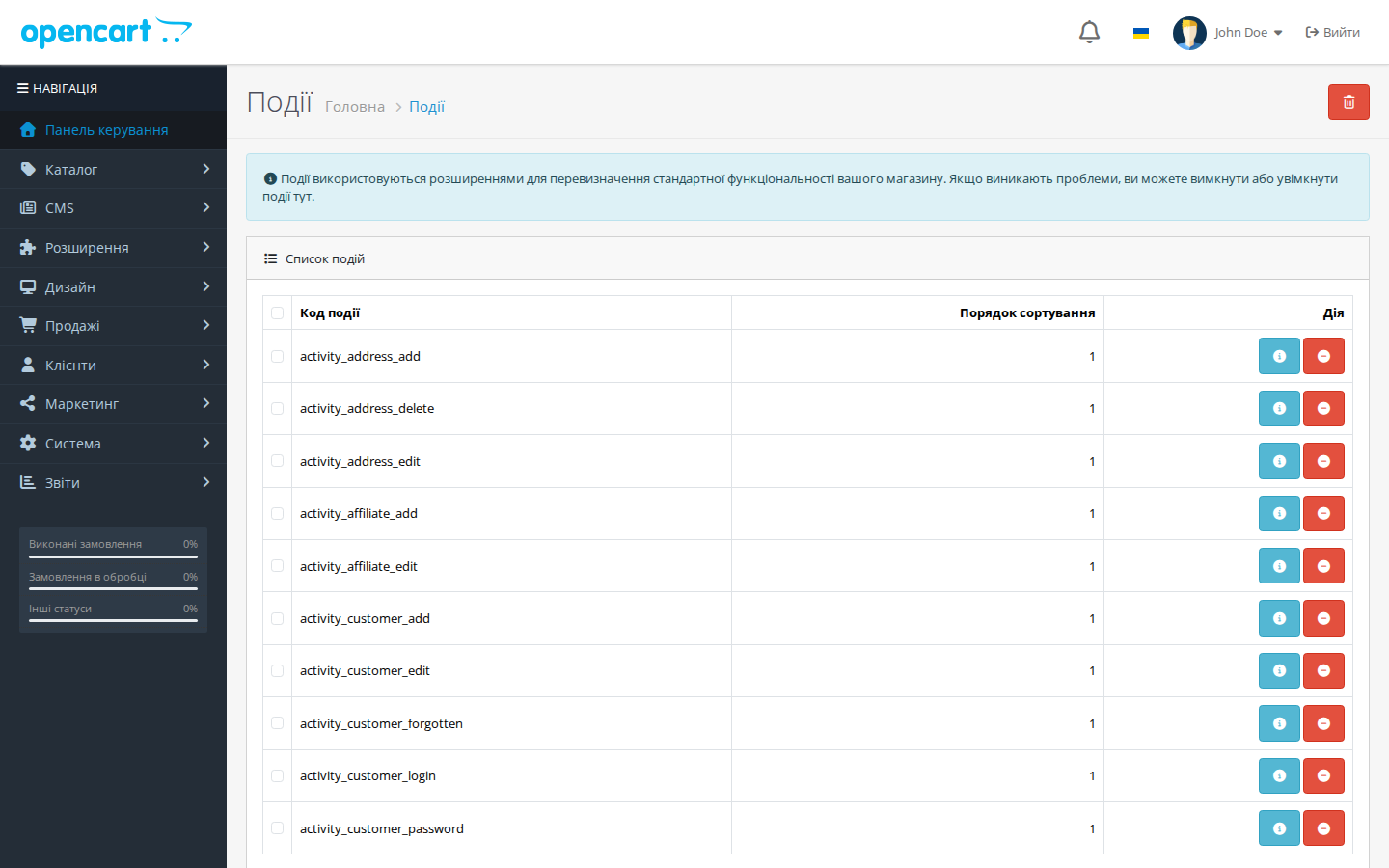
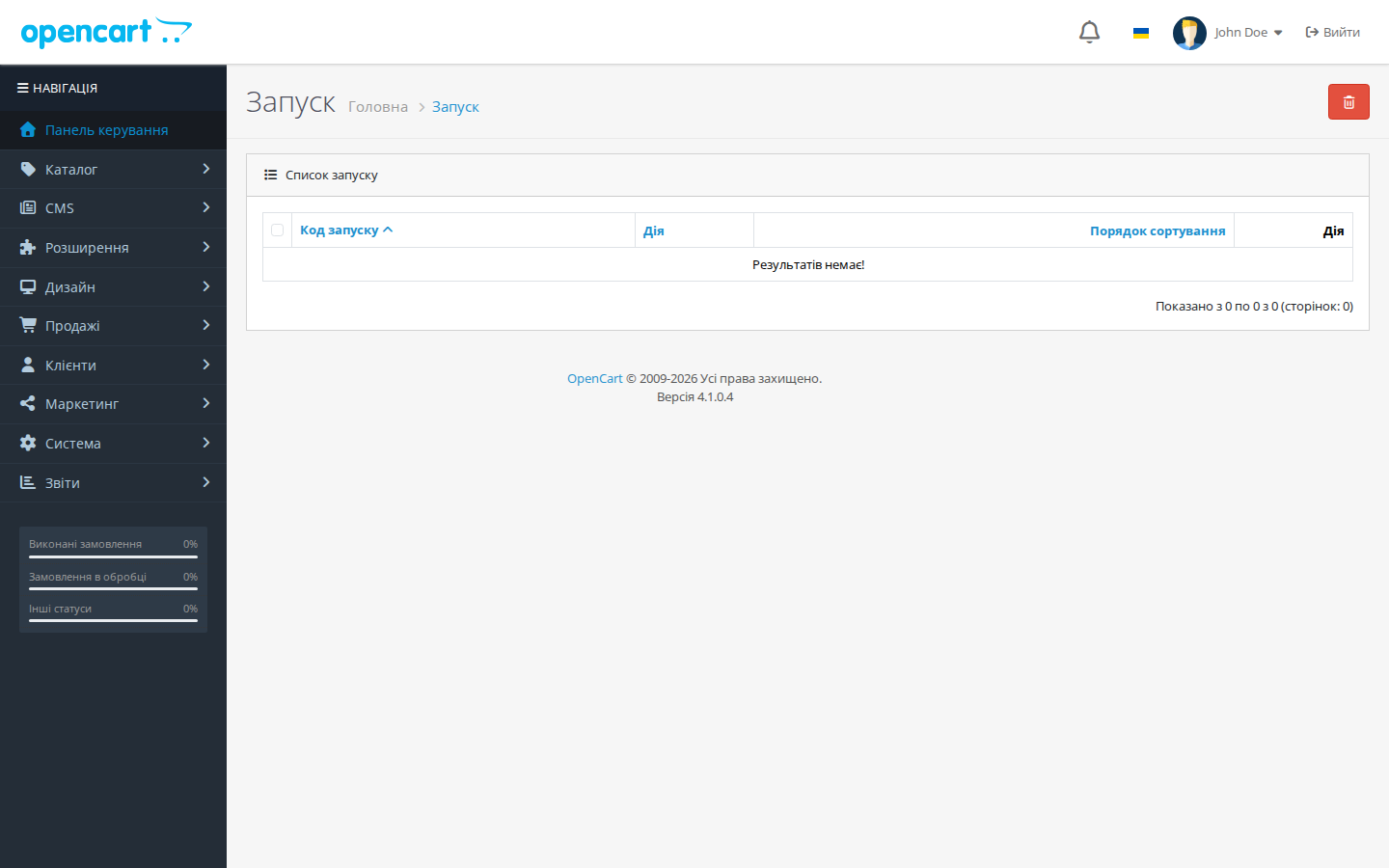
controller/маршрут/beforeandcontroller/маршрут/afterevents. In 4.x, they are called directly in framework.php around the main route and receive$route,$args, and$outputby reference. This means you can replace the route or change the finished HTML. Registered events can be viewed in the "Extensions → Events" section. - Code on every request. In 4.x, there is an "Extensions → Startup" section for this. Extension startup controllers are registered there and run at startup alongside the system pre-actions. In 3.0, there is no such section, and usually an event on an early route or an OCMOD on the startup controller is used instead.
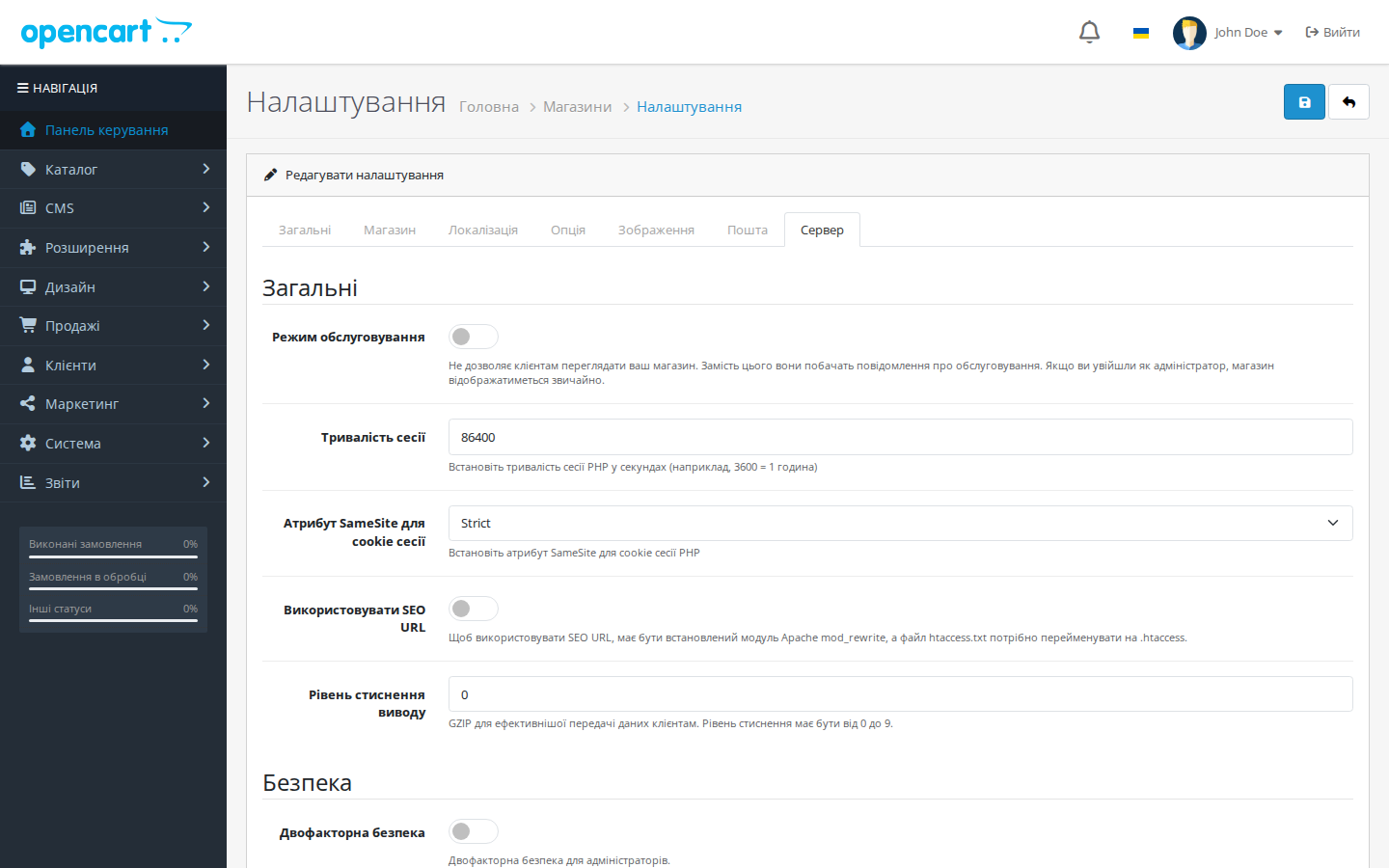
- Error diagnostics. Enable logging and, if needed, error output in "System → Settings" (System → Settings), "Server" tab (Server). Keep in mind that before the settings are loaded from the database, the
error_display/error_logvalues from thesystem/configfiles apply. So an error in the startup itself may not show up, even though output is enabled in the admin.
If the stack of modifications and events has become so tangled that sorting it out yourself is expensive, you can turn to OpenCart refinement and bug fixing. But in most cases, the log and an understanding of which stage of framework.php the failure occurred at are enough. Unfamiliar terms are easy to check against the OpenCart glossary of terms.
Summary
- The order is always this:
index.php→config.php→system/startup.php→system/framework.php→ pre-actions → controller →Response::output(). startup.phpprepares the environment: PHP version, HTTPS, autoloading.framework.phpbuilds the Registry and executes the route.- OpenCart 3.0:
start('catalog'), theRouterclass, OCMOD viamodification(), but framework.php itself is not modified by it. - OpenCart 4.x: the
APPLICATIONconstant, namespaces, an open dispatch loop, routes with a dot, methods with_closed to URLs, an exception handler with a redirect toerror_page. - Extend startup through events and startup controllers, not through core edits.
Next, it makes sense to look at how services from the Registry get into a controller and how the Loader works. These and related topics are collected in the section Architecture and files of OpenCart. The overall picture of the strengths and weaknesses of this architecture is given in the overview of OpenCart advantages and disadvantages.