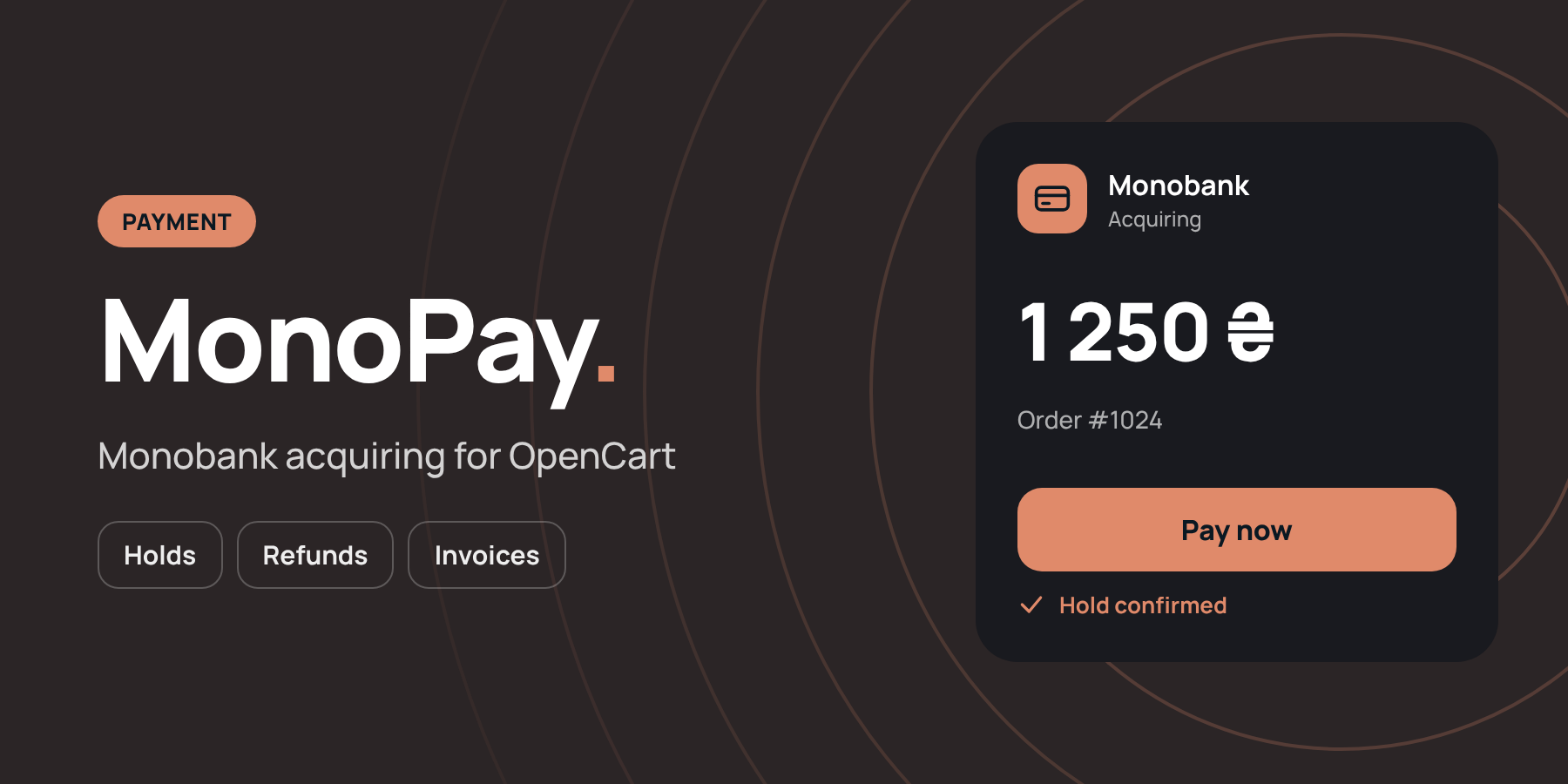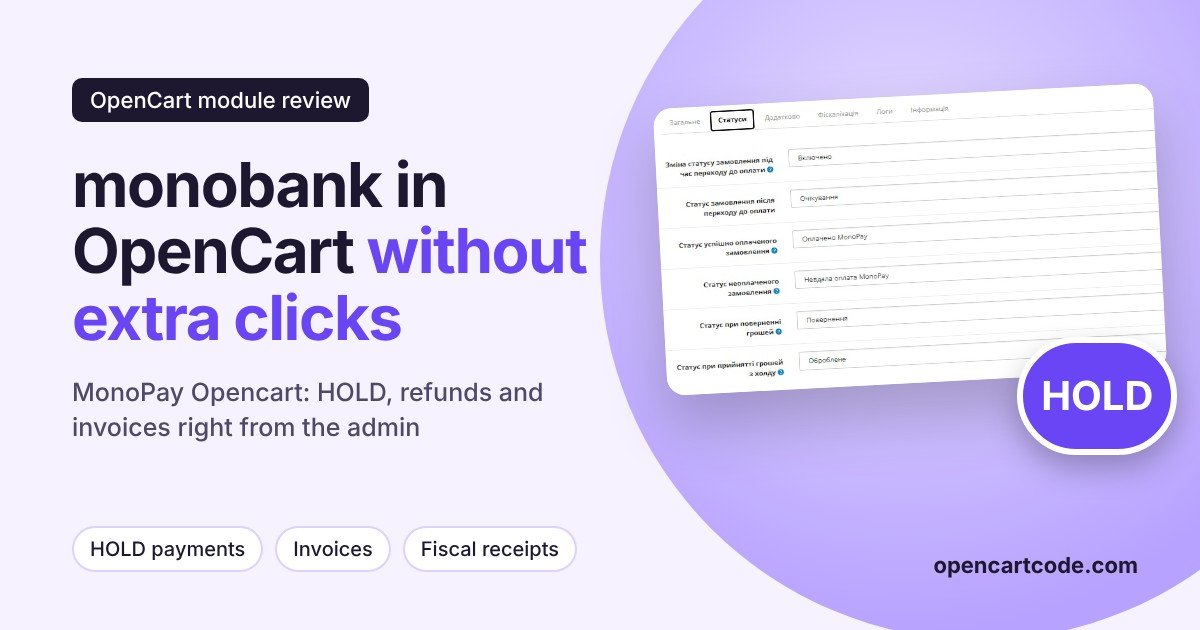
Monobank has long become a familiar payment method for Ukrainian buyers: open the app, confirm, done. For an OpenCart store, this means one thing: if mono acquiring is connected poorly, with manual status changes and no refunds from the admin panel, the manager spends extra minutes on every order. The "MonoPay Opencart" module from developer bogdan281989 connects monobank internet acquiring through the official API and moves payment management into the store's admin panel: HOLD, refunds, invoices, automatic statuses, fiscalization.
Below we will go through all the settings tabs and what the module adds to the order card. If you are still choosing between payment systems, start with a general overview of how to connect card payment in OpenCart, and here we will look specifically at MonoPay.
General settings: token and payment scheme
The first tab decides the main thing: how exactly the money reaches you and how the buyer sees the payment. Logs are also enabled here, which are very helpful at the start, when you need to understand what exactly the store sent to the bank and what the bank returned.
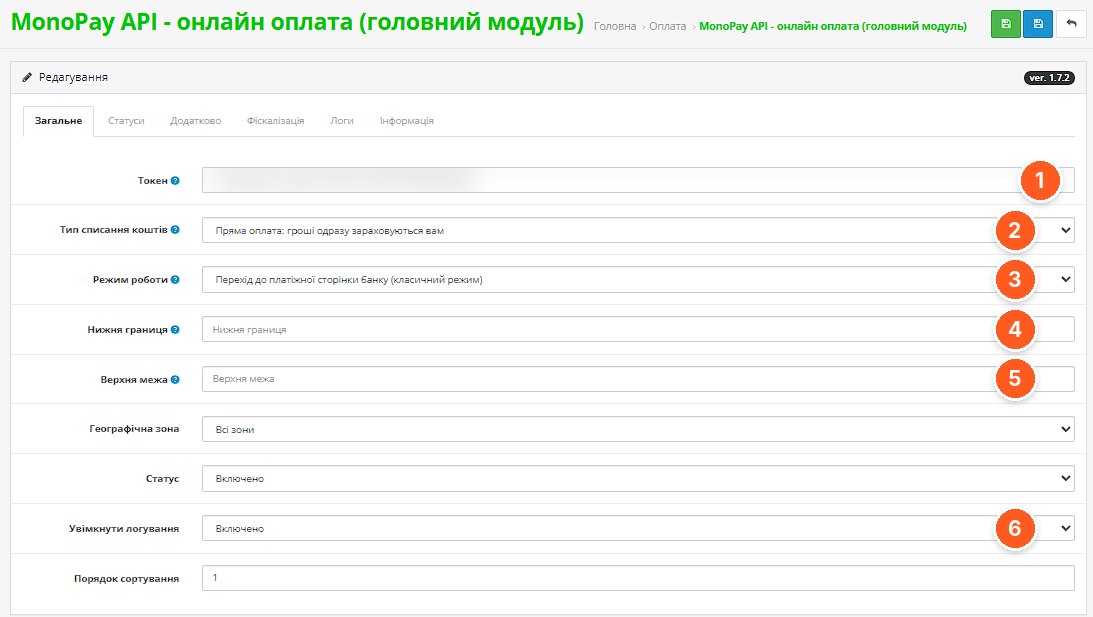
- Token. The merchant key from the monobank account, through which the module works with the bank's API.
- Type of fund debiting. Direct payment, when the money is credited to you immediately, or HOLD, when the amount is only frozen on the buyer's card until the manager confirms it.
- Operating mode. The classic redirect to the bank's payment page. Among the module's capabilities, the developer also mentions displaying a payment widget.
- Lower limit. A restriction on the order amount, as in standard OpenCart payment modules.
- Upper limit. The second boundary of the same range: convenient if you want to accept large checks by another method.
- Enable logging. Records the exchange with the bank in the "Logs" tab, where you can see the request data, the response with the payment link, and callbacks from monobank.
Order statuses
This is where the module saves the most time. Each payment event corresponds to its own order status, so the manager sees the picture from the order list without logging into the bank's account.
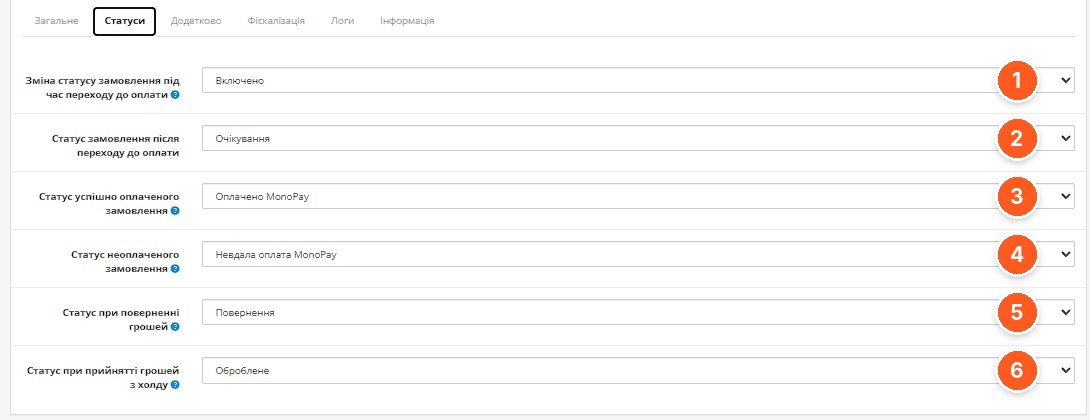
- Status change when going to payment. Whether to change the status as soon as the buyer goes to the payment page.
- Status after going to payment. For example, "Pending": the order is created, the money has not arrived yet.
- Status of a successfully paid order. Set automatically after confirmation from the bank.
- Status of an unpaid order. For a failed payment, so the manager can contact the buyer right away.
- Status when money is refunded. Set after the funds are returned from the admin panel.
- Status when money is accepted from hold. For the HOLD scheme: the order is confirmed, the funds are debited.
Additional parameters
A tab for fine-tuning. Most stores will leave the default values, but a few items are worth knowing.
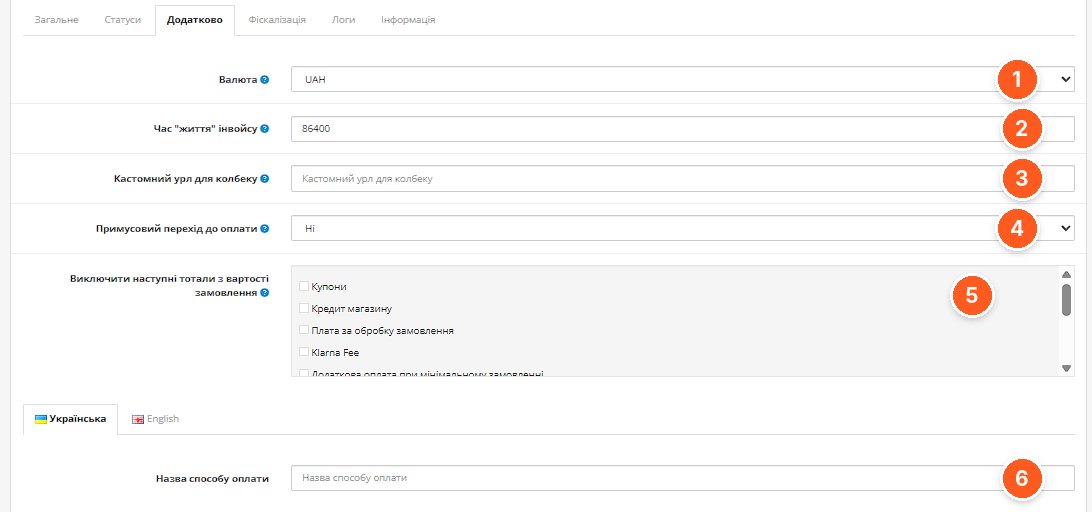
- Currency. The currency in which the invoice is sent to the bank.
- Invoice lifetime. How many seconds the payment link is valid; the default is 86400, that is, one day.
- Custom callback URL. Needed if the standard callback address on your server is unavailable to the bank.
- Forced redirect to payment. Whether to send the buyer to payment automatically after placing the order.
- Exclude totals from the order value. You can leave out certain summary lines (coupons, store credit, fees) from the amount sent to the bank.
- Payment method name. Set separately for each store language.
Fiscalization
If you work with fiscal receipts through monobank, the module passes the receipt data to the bank.
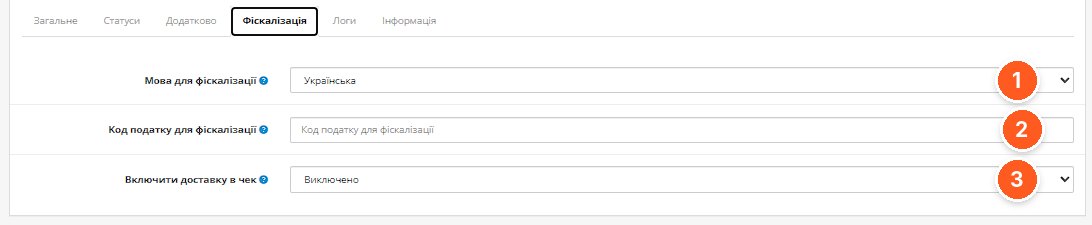
- Fiscalization language. The language in which the receipt is generated.
- Tax code for fiscalization. The tax group for receipt items.
- Include delivery in the receipt. Whether to add delivery as a separate item.
MonoPay transactions
A separate list of payments with filters appears in the "Sales" section. It is convenient for reconciliation: you can see the payment amount and what reached you after the commission. In its description, the developer marks viewing the payment list as test mode, so before purchasing it is worth clarifying how ready this part is for daily use.
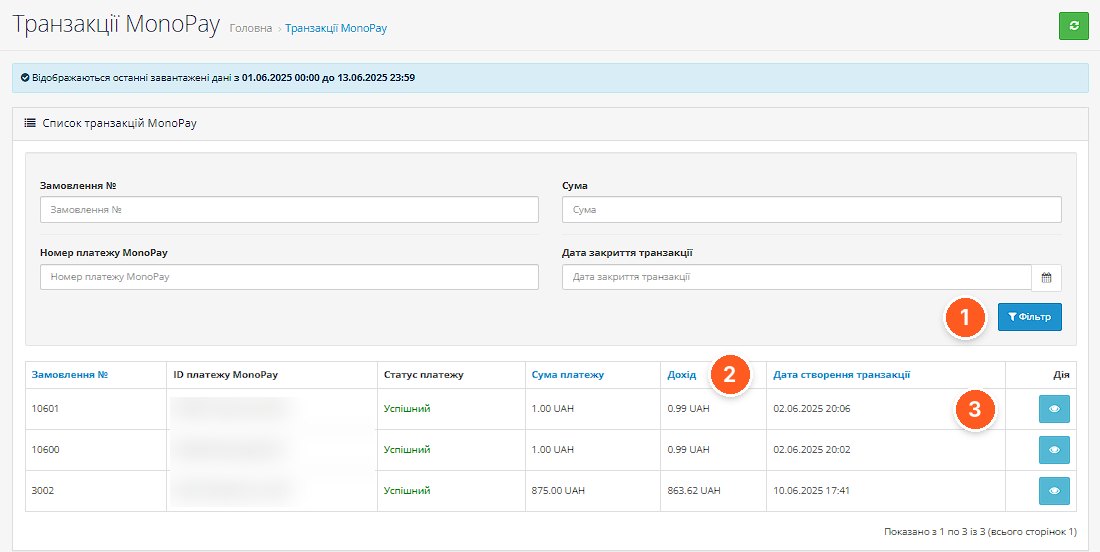
- Filter. Search by order number, amount, MonoPay payment number, and transaction closing date.
- Income. The amount you receive after the bank's commission is deducted.
- View. Detailed information about a specific transaction.
Payment directly in the order card
A MonoPay button with a menu appears on the order page: invoices, the transaction of this order, and all invoices. Payment details open in a window, from where money can also be refunded.
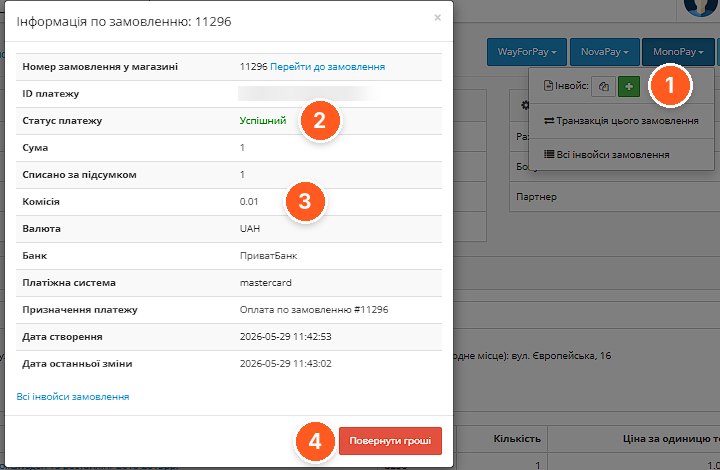
- MonoPay menu. Creating an invoice, copying the link, going to the transaction, and the list of the order's invoices.
- Payment status. The current state of the payment from the bank.
- Commission. Visible at once, without the monobank account, together with the bank and the buyer's payment system.
- Refund money. Refund of funds from the admin panel; the order status changes according to the settings.
Invoice from the admin panel
Useful for orders by phone or messenger: the manager generates a payment invoice with the needed products and sends the buyer a link.
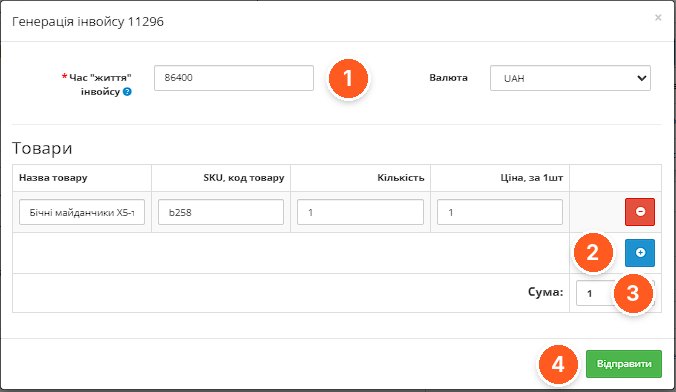
- Invoice lifetime. The validity period of the link for this specific invoice.
- Add product. The invoice composition can be changed: items can be added or removed.
- Amount. The total due for payment.
- Send. Creating the invoice in monobank.
How the buyer sees it
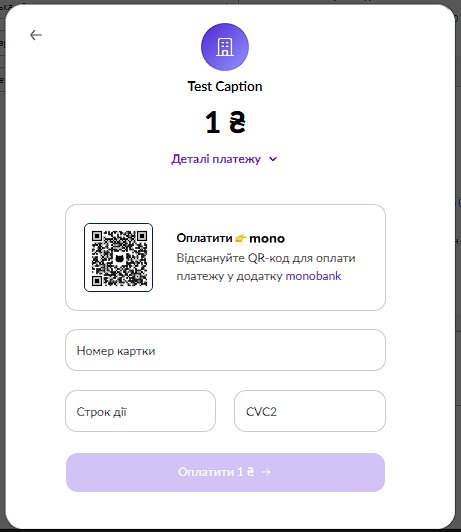
The buyer receives the familiar monobank form: a QR code for payment in the app or entry of card details.
What to consider before purchasing
- OpenCart 2.0.3–2.3.0, 3.0.x and 4.1.0 are supported, as well as ocStore and OpenCart.Pro. PHP from 5.6 to 8.2.
- ionCube Loader is required. Activation with a license key, license for one domain.
- The module contacts the developer's server, but according to the developer it continues to work if that server is unavailable.
- An active monobank internet acquiring and a token from the merchant account are required.
- The developer claims compatibility with most OpenCart templates, separately with OCTemplates templates and the Smart Checkout module. With other non-standard checkout designs, it is worth checking operation on a test copy.
- The screenshots show version 1.7.2, the current module version is 1.7.4, so the interface may differ somewhat.
Who it is suitable for
Stores where many buyers pay through monobank, and especially those who need HOLD: made-to-order goods, stock verification, manual confirmation. Also those who accept orders by phone and want to send payment links directly from the admin panel.
If you need one aggregator for all banks rather than a separate monobank acquiring, or if ionCube cannot be installed on your hosting, this module is not the right choice for you.
"MonoPay Opencart" by bogdan281989 on the OpenCart Code marketplace. You can ask the developer questions about setup directly on the module's page.