The standard LiqPay in OpenCart can do one thing: send the buyer to the payment page and wait for a response. That is enough until real tasks come up: taking a prepayment instead of the full amount, holding funds on a card until the stock is checked, sending the customer a payment link after the manager has clarified the order, or passing data to LiqPay for a fiscal receipt. The module "Liqpay API Opencart" from developer bogdan281989 covers exactly these scenarios, and everything is managed from the store's admin panel.
The package includes three related payment methods: the main module, a separate "Prepayment" method, and a copy of the main module with its own API keys for єПідтримка or any other LiqPay account. Below we'll go through the settings screens and what appears in orders.
If you are still choosing a payment system, first take a look at our comparison of card payment modules for OpenCart, and here we'll cover LiqPay in detail.
Main settings: keys, payment type, and workflow
The first tab of the main module. Here you connect your LiqPay shop and choose how the buyer will pay. For testing, you can enter sandbox keys from the LiqPay dashboard, and after testing, replace them with live keys.
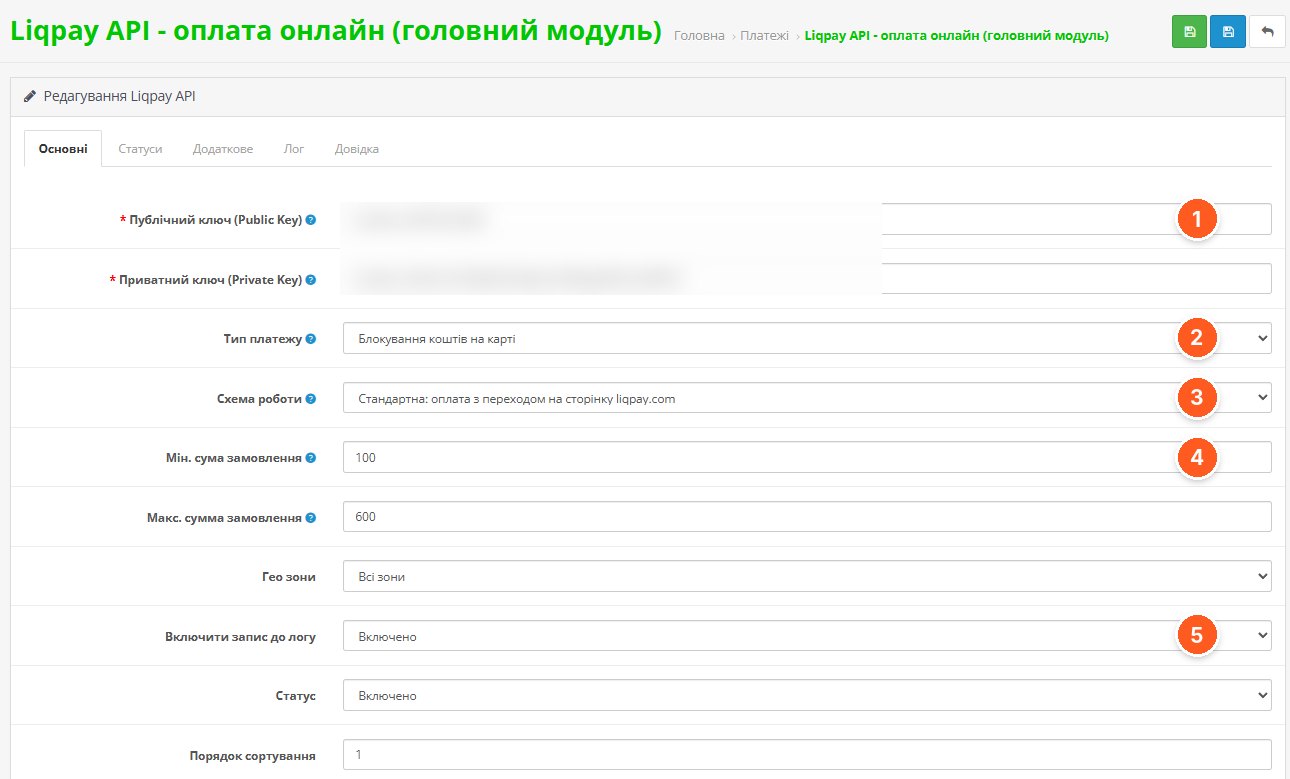
- Public and private key. Taken from the LiqPay dashboard. The method will not work without them.
- Payment type. Regular charge, or holding funds on the card (two-step payment, Hold): the funds are reserved, and the manager charges them after confirmation.
- Workflow. Standard, with redirection to liqpay.com, or an embedded widget on the checkout page or in a pop-up window, without leaving the site.
- Minimum and maximum amount. The method is shown only for orders within the specified range. Geo zones are configured alongside.
- Logging. The module logs all requests and responses from the payment system. The log is viewed on a separate tab, and this is the first place to look if a payment "hangs."
Order statuses for each event
The module is not limited to a single "Paid" status. You can assign a separate order status to each payment event, and the manager immediately sees in the list at which stage the money is.
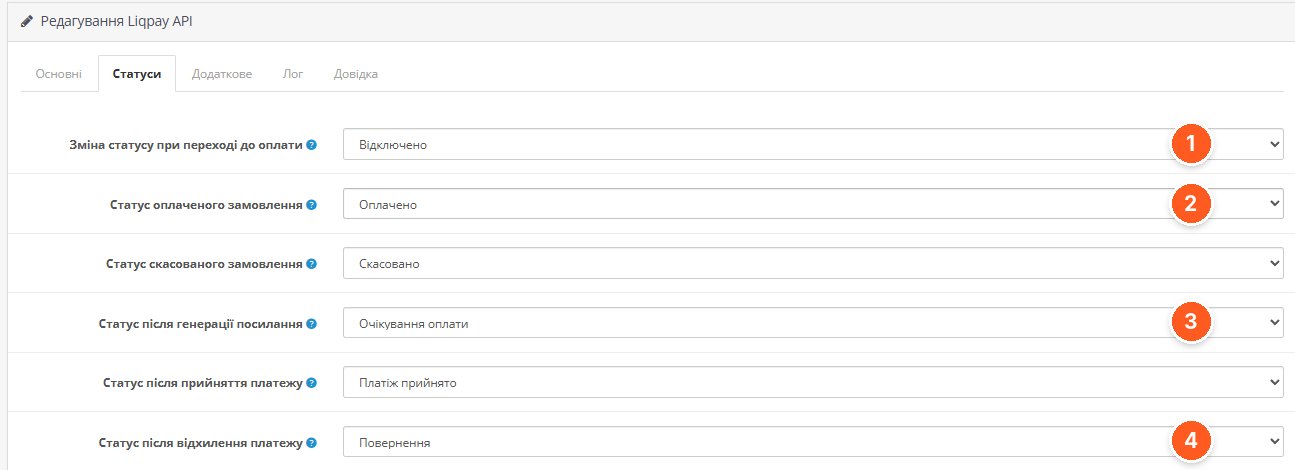
- Status change when proceeding to payment. You can change the status before payment, so you can see orders where the buyer went to pay but did not complete it.
- Status of a paid order. Set after a successful payment. A separate status for cancelled orders is set below.
- Status after generating a link. For orders for which the manager manually generated a payment link from the admin panel.
- Status after payment rejection. Together with the status after acceptance, it applies to two-step payment: what happens to the order when the manager accepts or refunds the funds.
Additional parameters: currency, language, and payment options
The "Additional" tab contains settings that affect the payment page the buyer sees. By default, the module determines the currency and language automatically, but everything can be set manually.
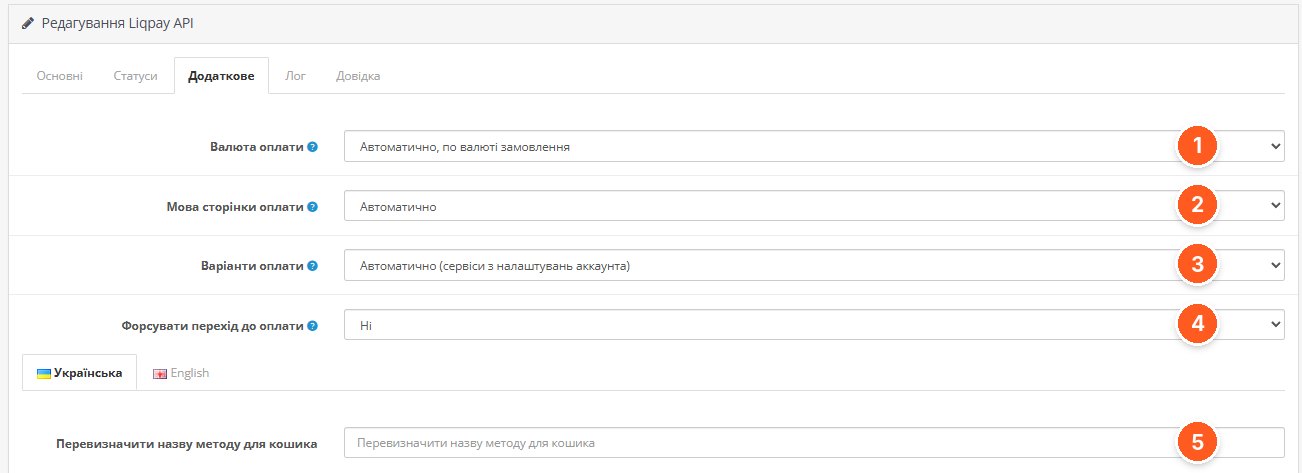
- Payment currency. Automatically based on the order currency, or fixed.
- Payment page language. Automatic detection or manual selection.
- Payment options. Taken from the LiqPay account settings or set manually: card, Apple Pay, Google Pay, LiqPay wallet or Privat24, invoice by e-mail, QR code, Masterpass.
- Force redirect to payment. A separate switch for the behavior of redirecting to payment after the order is confirmed.
- Method name for the cart. You can override how the method is labeled at checkout, separately for each store language.
Prepayment: fixed amount or percentage
A separate payment method for partial prepayment. It works only together with the main module and takes its keys from it. This scenario is typical for stores with cash-on-delivery shipping: the buyer pays part online and the rest upon receipt.
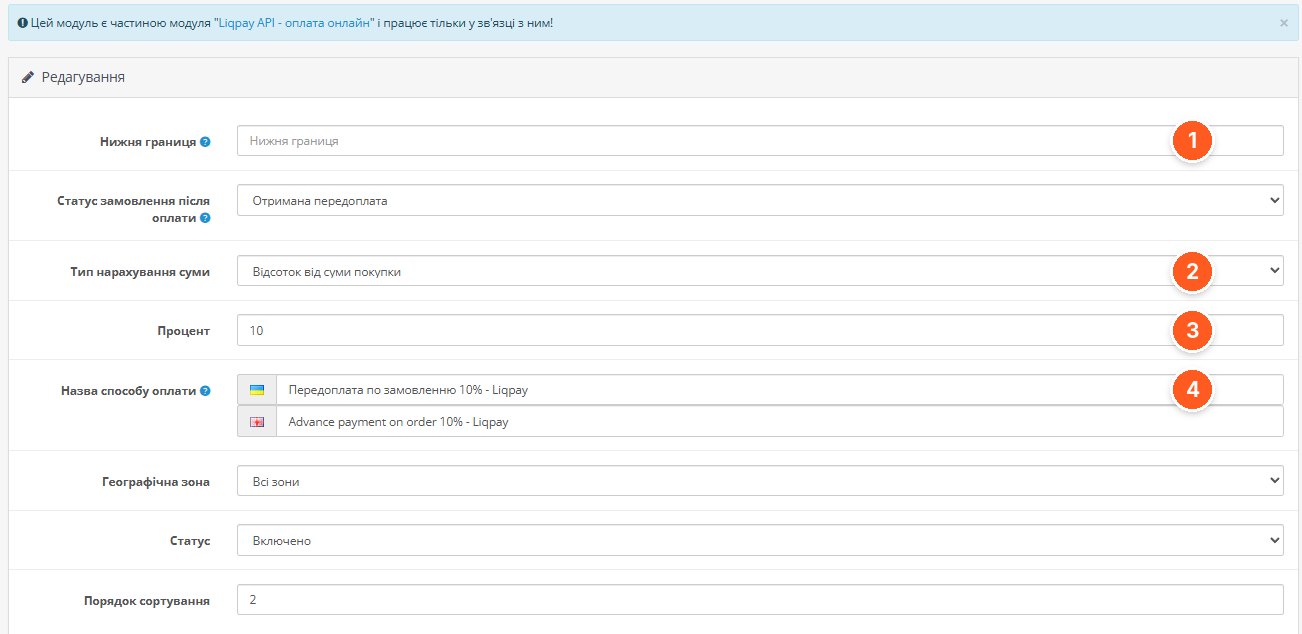
- Lower limit. The minimum order amount from which a prepayment is offered.
- Amount calculation type. A fixed amount or a percentage of the purchase total.
- Percentage. The size of the prepayment, 10% in the screenshot.
- Payment method name. Set for each language, for example "Prepayment 200 UAH LiqPay," so the buyer immediately sees how much they are paying now.
The third method in the package, the copy for єПідтримка, is configured the same way as the main one, but with separate API keys. It can also be used for any other LiqPay account.
Payment link from the order card
The order card has a "Liqpay" button in its menu. From there, the manager generates an invoice: a payment link that can be sent to the customer by email directly from the admin panel. This is convenient when an order came in by phone or when stock has changed and the amount needs to be recalculated.
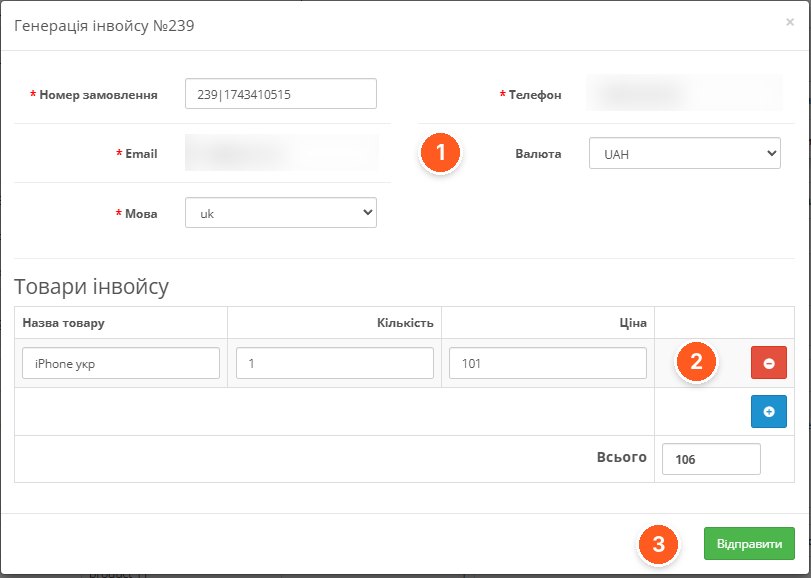
- Invoice details. The order number, customer contacts, language, and currency are pulled from the order.
- Invoice items. Items can be edited, added, and removed before sending.
- Sending. The buyer receives the payment link. A validity timer in minutes is set for the link.
Two-step payment: accept or refund
If funds holding is selected in the main settings, the buyer's money is reserved on the card, and the manager makes the decision. The module takes transaction information from the LiqPay API directly in the order card.
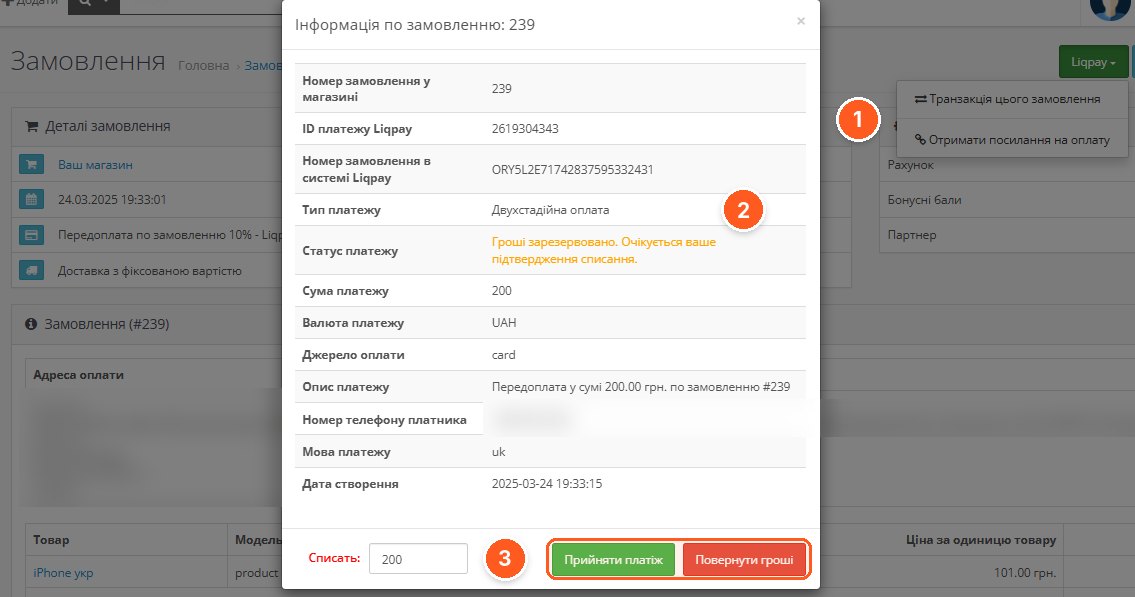
- "Liqpay" menu in the order. View the transaction for this order and get the payment link.
- Payment type and status. It shows that the payment is two-step and the funds are reserved pending confirmation.
- Charge and decision. The amount to be charged and the "Accept payment" and "Refund" buttons.
This is useful when the product must first be located in the warehouse or with the supplier: you won't have to process a refund for funds that have already been charged.
Transaction log
A "Liqpay Transactions" section appears in the "Sales" menu. Here all payments are in one list, without logging into the LiqPay dashboard.
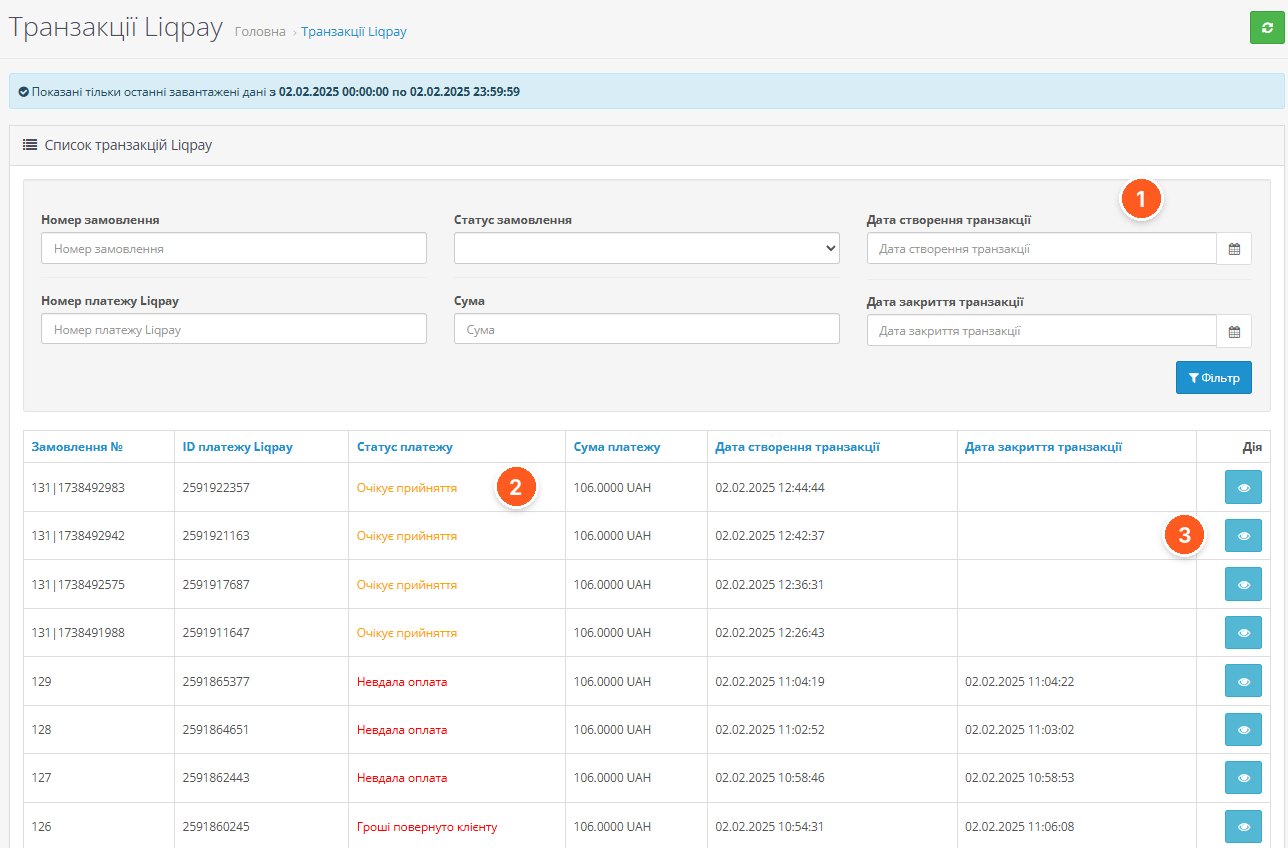
- Filters. By order number, LiqPay payment number, status, amount, and transaction creation and closing dates.
- Payment status. Awaiting acceptance, failed payment, funds refunded to the customer: visible at a glance, without going to the dashboard.
- Details. The view button opens full information about the transaction.
Products for fiscalization
The module passes product data to LiqPay for generating fiscal receipts. For this, there is a "Liqpay Products" section, where store products are linked to products in the LiqPay dashboard. The settings define the receipt language and the field used as the article code (model, sku, ean, isbn, etc.).
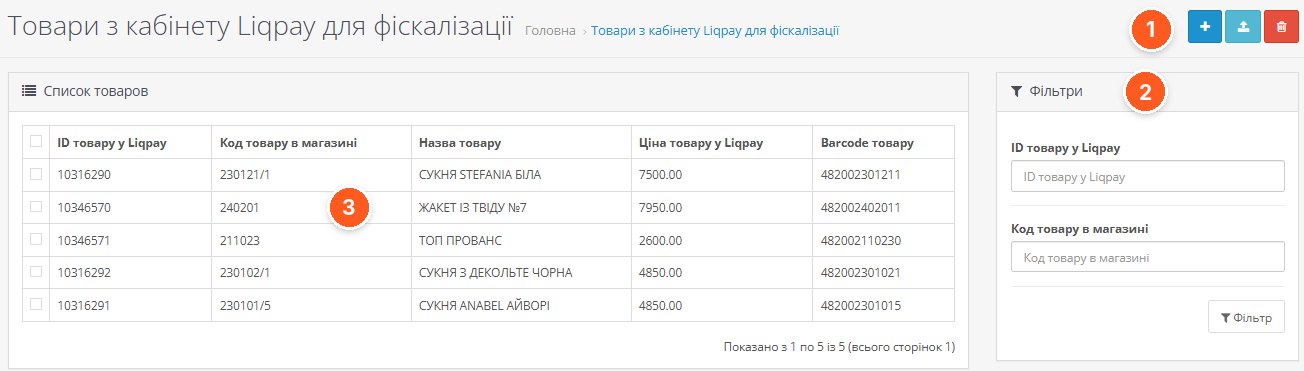
- List management. Add a product manually, upload a list, or delete items.
- Filters. Search by product ID in LiqPay and product code in the store.
- Code matching. The link between the product ID in LiqPay and the product code in the store, name, price, and barcode.
What to consider before buying
- ionCube Loader is required. Before purchasing, check that it is enabled on your hosting for your PHP version.
- Activation is through the add-on's official website, with a license for one domain. The module contacts the developer's server, but according to its specifications, it continues to work if that server is unavailable.
- According to its specifications, the module works on OpenCart 2.0.3–3.0.5 and 4.1.0, as well as on ocStore 2.x and 3.x. PHP from 5.6 to 8.2.
- The screenshots were taken on ocStore 3.0.3.7; the current module version at the time of review is 2.3.0. You can check for updates directly from the admin panel.
- The developer states full compatibility with OCTemplates themes and the Smart Checkout module. If you have a different non-standard checkout, especially with an embedded widget, check compatibility with the developer.
- Fiscal receipts are generated by LiqPay from the product data transmitted by the module. How fiscalization is connected on the LiqPay side should be clarified with the payment system before launch.
Who it is for
Stores that already work with LiqPay and want more than just a payment button: prepayment for delivery, two-step payment for made-to-order products, payment links for phone orders, a transaction log in the admin panel, and fiscal receipts. It will also be especially useful for those who accept payments through єПідтримка on a separate account.
If regular card payment without prepayments and manual order handling is enough for you, and your hosting does not have ionCube, a simpler solution may be sufficient. You can compare the options in the payment modules overview, linked at the beginning of the article.
"Liqpay API Opencart" by bogdan281989 on the OpenCart Code marketplace. You can ask the developer setup questions directly on the module's page.