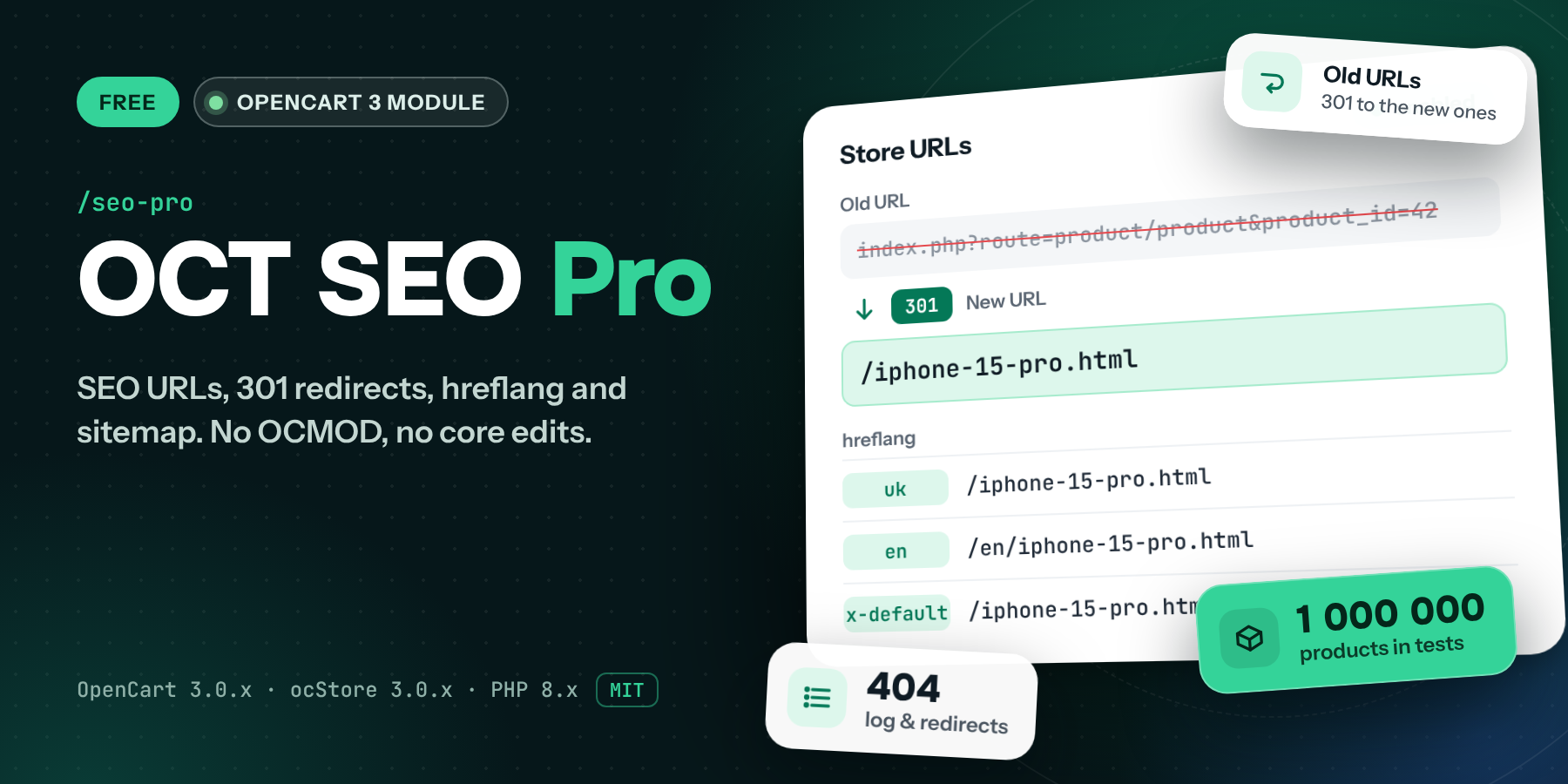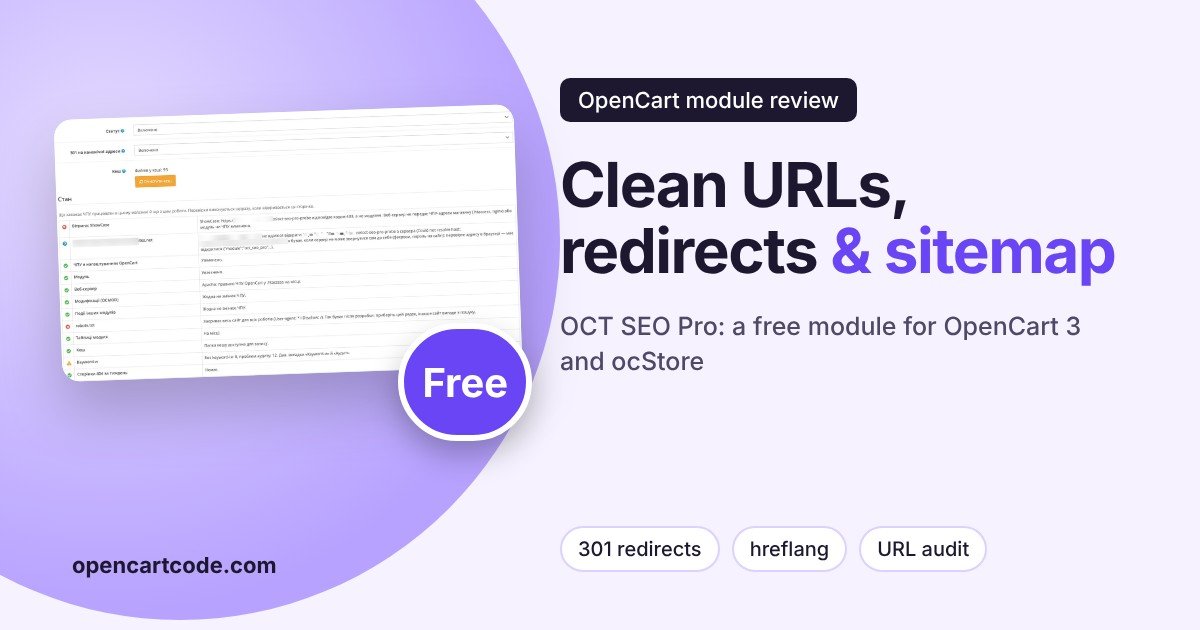
Store URL settings are usually configured once and remembered only when SEO traffic suddenly drops: the old address returns 404, duplicate pages appear in the storefront, or Google sees the wrong language versions. «OCT SEO Pro» from OCTemplates covers all of this in one place: SEO-friendly URL format, 301 redirects, language prefixes with hreflang, a custom sitemap, noindex for service pages, and keyword audit. The module is free, under the MIT license. Let's go through the admin tabs in the order you should configure them.
General Settings and the "Status" Block
After installation, open the "General" tab. It has two switches, the cache, and the most useful part of the module: the "Status" block. It automatically checks what prevents SEO URLs from working: disabled SEO URLs in OpenCart settings, a missing .htaccess, conflicts with OCMOD modifications and events from other modules, and robots.txt. For each item, the module explains what to do about it.
The screenshot shows a test environment, so two lines are red: the service check address returns code 403, and robots.txt contains Disallow: / for all robots. On a live store, that line must be removed, otherwise the site will drop out of search. The module itself says the same.
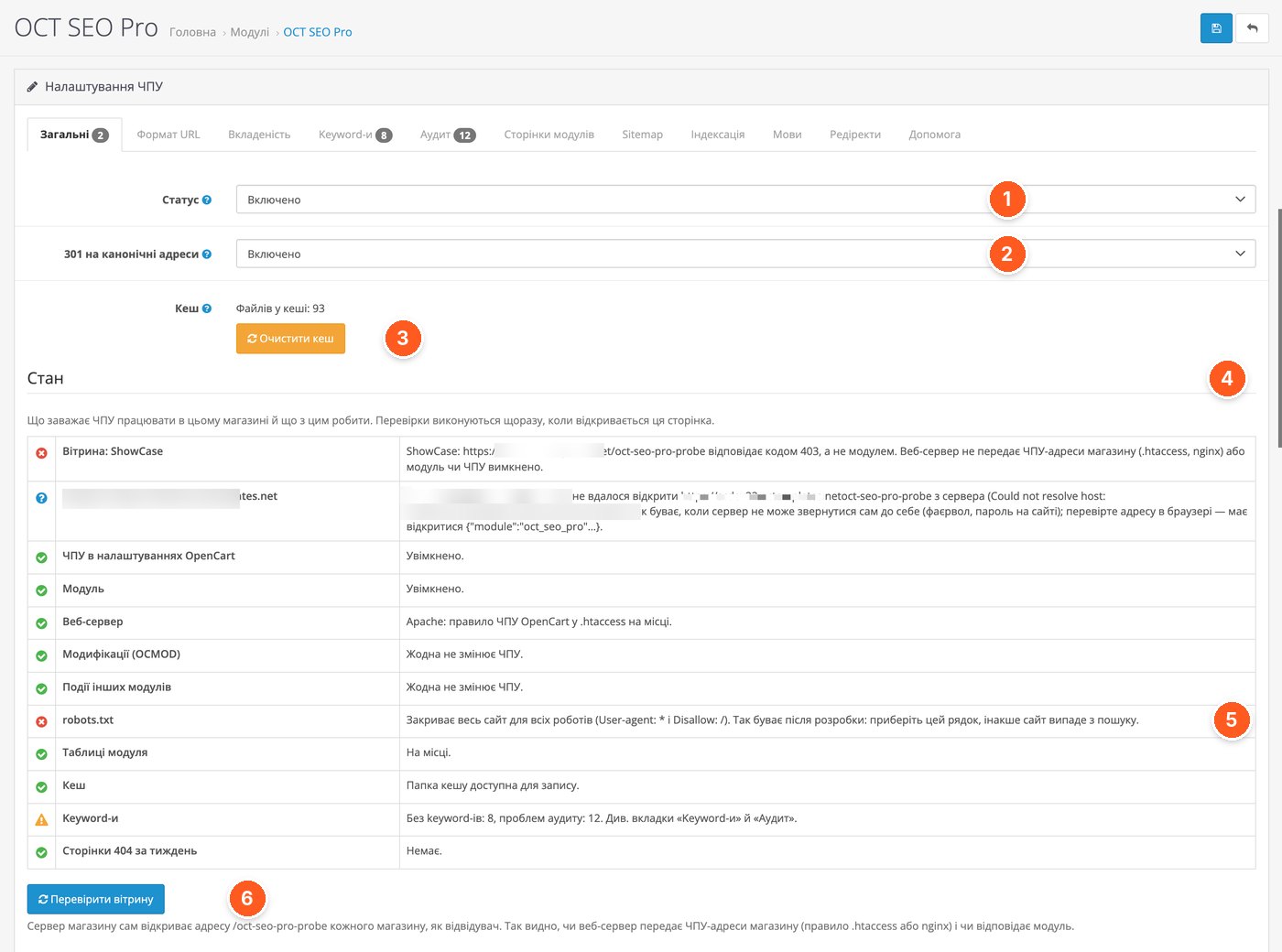
- Status. The main switch. If you disable the module, the store returns to the standard OpenCart SEO URLs.
- 301 to canonical addresses. Redirects from index.php?route=…, a different letter case, a different ending, or an old nesting structure to the correct address.
- Cache. A counter of cache files and a clear button. Files, Redis, Memcached, and APCu are supported.
- "Status" block. A list of checks: SEO URLs in OpenCart, web server, OCMOD, events from other modules, module tables, cache, robots.txt, and the number of 404 errors per week.
- robots.txt. Red line: the file blocks the site from all robots. The module suggests removing Disallow: /.
- "Check storefront". The module opens the service address /oct-seo-pro-probe of each store and checks whether the web server passes SEO URL addresses to the module.
URL Format
For each page type, you set its own prefix, postfix, and ending: none, a slash, or .html. There are eight types: product, category, manufacturer, information page, service page, blog category and article, and promotion. On the right, the module immediately shows what the address will look like. The keywords themselves (SEO URL) are set as usual: in the product form, category form, and so on.
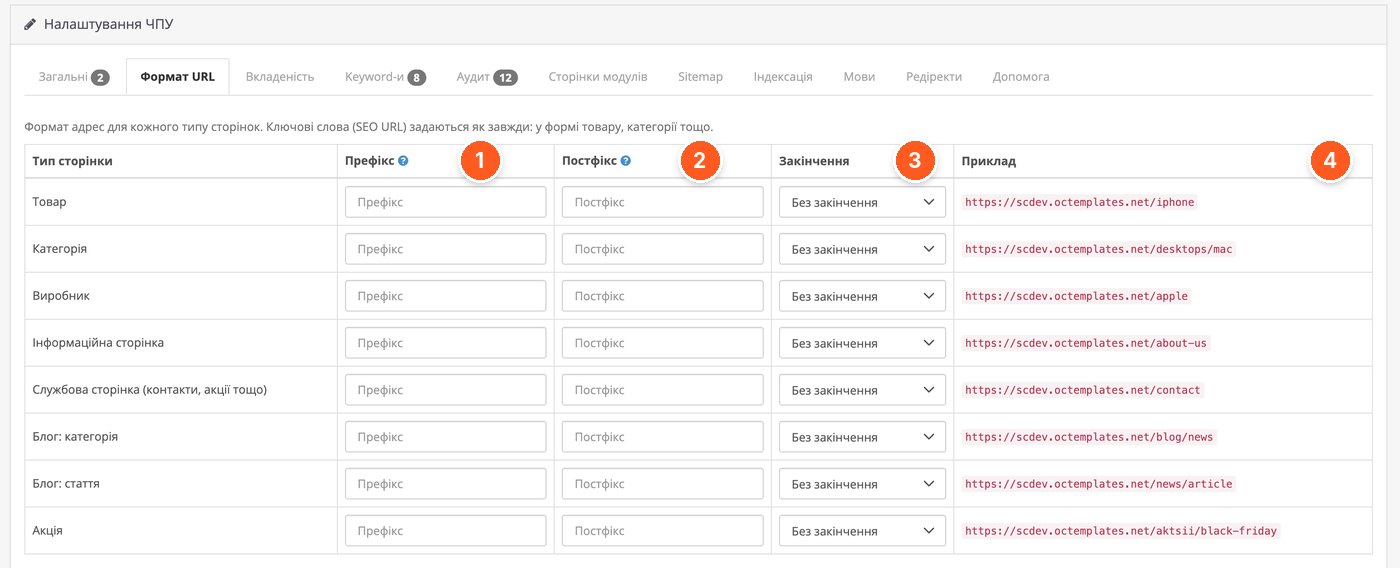
- Prefix. Text before the keyword, for example /brand/apple.
- Postfix. Text after the keyword.
- Ending. No ending, a slash, or .html, for example /iphone.html.
- Example. A ready address for the current settings: a format error is visible before saving.
Category Nesting and Main Category
You can separately configure whether categories appear in the address. For products, there are three options: no category, only the main category, or the full path. You can limit the maximum depth.
In the product form, on the "Relations" tab, a "Main category" field appears. It is stored in the main_category column of the product_to_category table, as in ocStore, so feeds, imports, and templates made for ocStore can see it, and the column remains after the module is removed. If no main category is selected, the deepest category of the product is used, and among several equally deep ones, the one with the smallest id. The main category also determines the product's breadcrumbs.
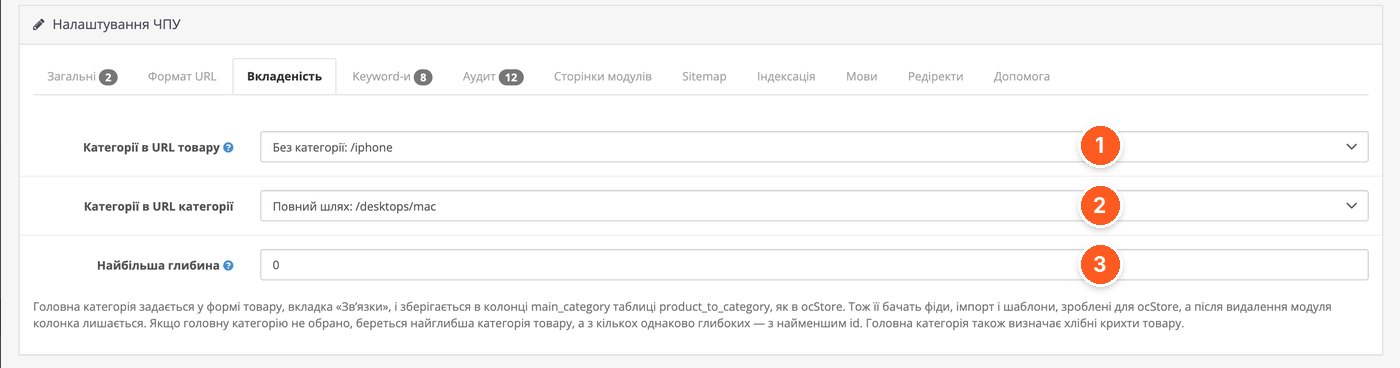
- Categories in product URL. The screenshot shows "No category: /iphone". Other options: only the main category or the full path.
- Categories in category URL. The screenshot shows the full path: /desktops/mac.
- Maximum depth. Limits the number of category levels in the address.
Keywords: Generation from Names
The "Keywords" tab removes manual work. The module creates keywords from the names of products, categories, manufacturers, articles, blog posts, and OCTemplates promotions, as well as pages of connected modules. It creates them only where a keyword does not yet exist: it never changes existing ones. If a keyword is already taken by another page, a language prefix, or a type prefix, a number is added: iphone-2.
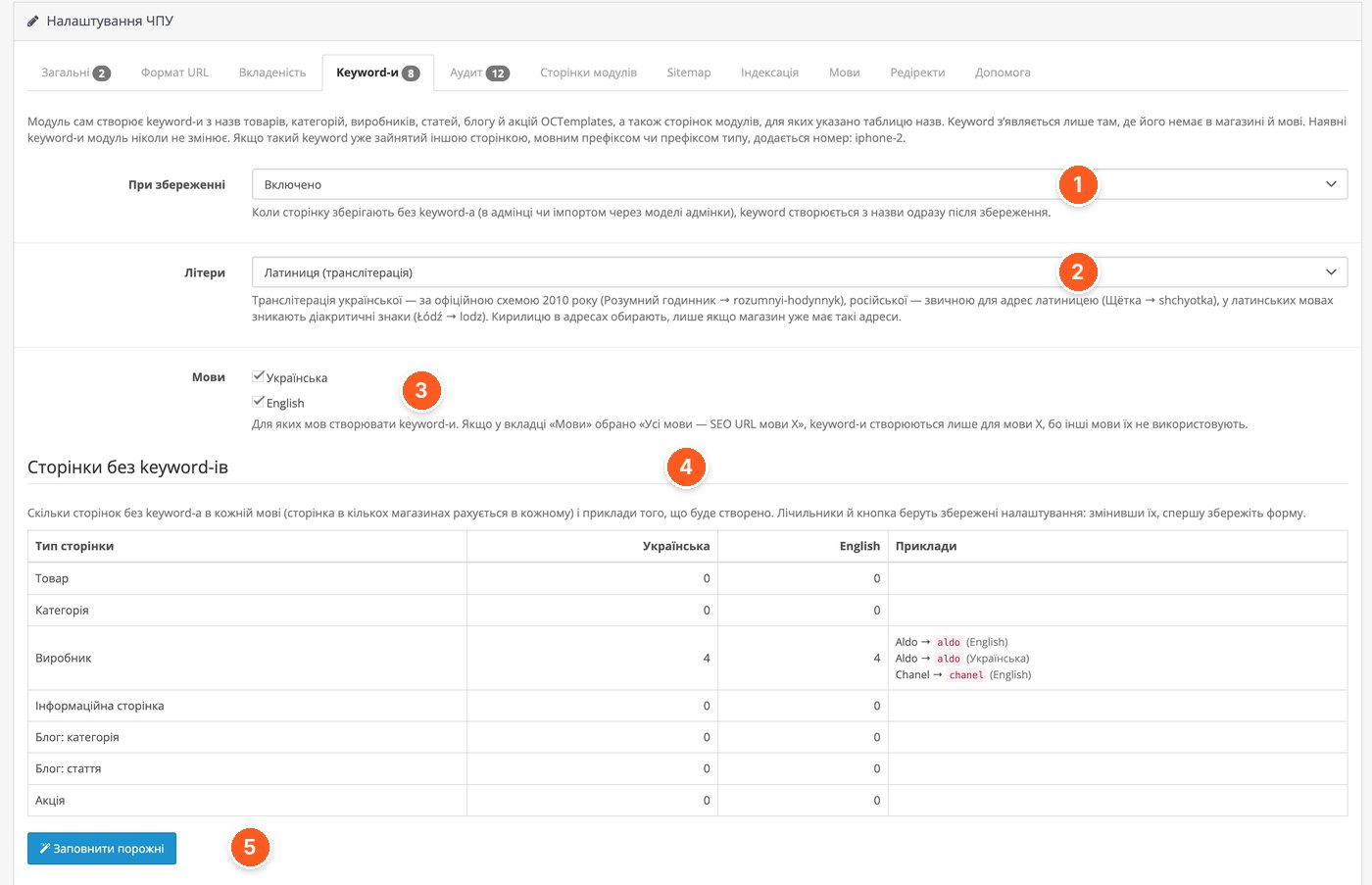
- On save. If a page is saved without a keyword (in the admin or via import through admin models), the keyword is created from the name immediately after saving.
- Letters. Latin with transliteration: Ukrainian according to the 2010 scheme (Розумний годинник → rozumnyi-hodynnyk), Russian and Polish as well. Cyrillic in addresses is chosen only when the store already has such addresses.
- Languages. Which languages to create keywords for.
- Pages without keywords. How many pages without a keyword exist in each language, and examples of what will be created. The screenshot shows four manufacturers.
- "Fill empty". Creates all missing keywords with one click. Counters and the button use saved settings, so save the form first.
Keyword Audit
The "Audit" tab checks all keywords in "Design → SEO URL": duplicates, invalid characters, Cyrillic, conflicts, and keywords of deleted pages. Up to 50 rows of a group are shown, and the button fixes the whole group. The screenshot shows the first two groups; the rest are empty.
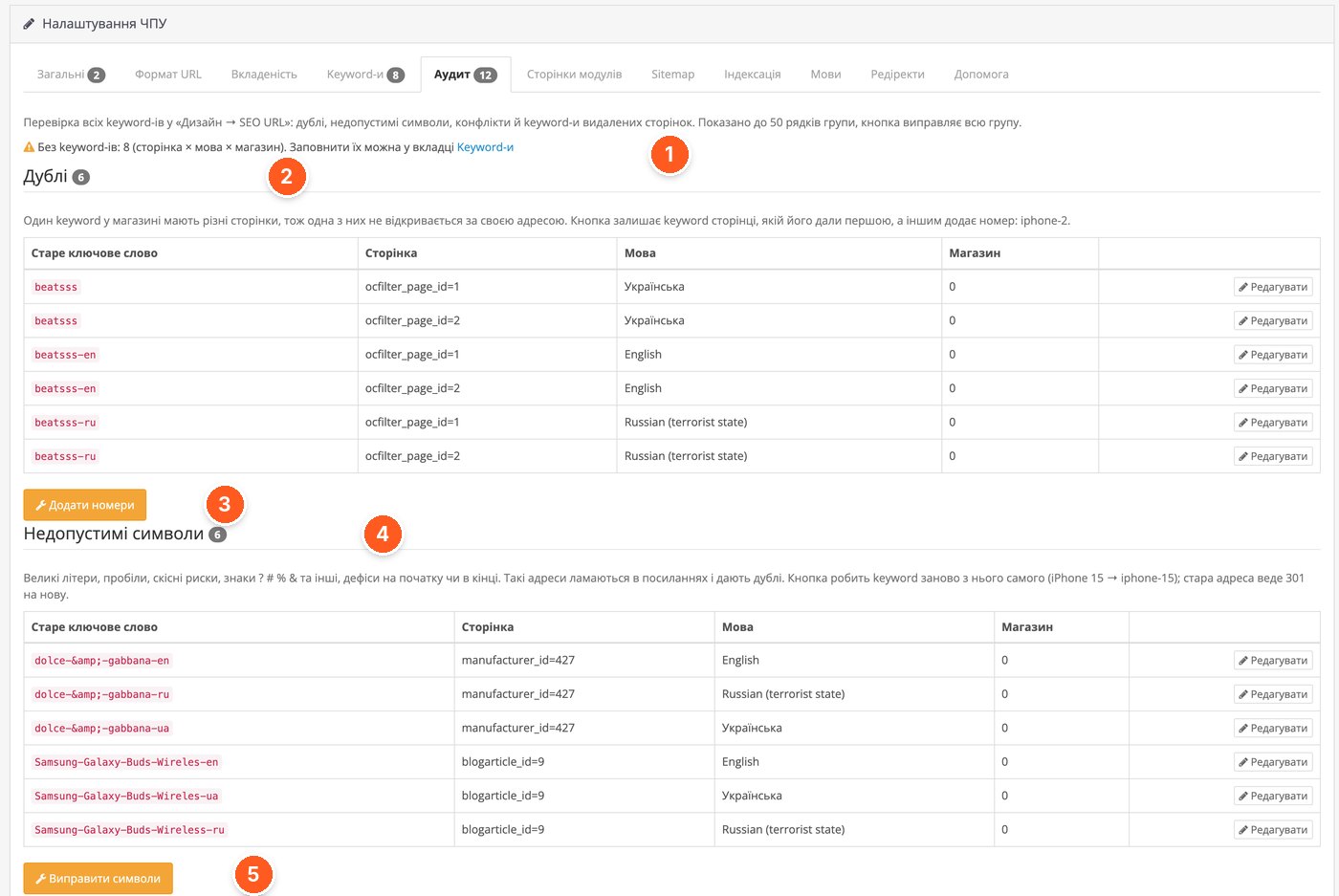
- Warnings. How many pages lack a keyword (page × language × store), and a link to the "Keywords" tab.
- Duplicates. One keyword used by different pages: only one of them opens at its address.
- "Add numbers". Leaves the keyword with the page that received it first, and adds a number to the others: iphone-2.
- Invalid characters. Capital letters, spaces, slashes, the characters ? # % &, hyphens at the beginning or end. Such addresses break in links and create duplicates.
- "Fix characters". Recreates the keyword from the name (iPhone 15 → iphone-15), and the old address redirects with 301 to the new one.
Pages of Other Modules
The module picks up the blog and promotions of OCTemplates templates automatically as soon as they exist in the store. For everything else, there is the "Module Pages" tab: you specify the route and key, and the addresses are built the same way as for products and categories: with the format, language prefixes, 301 redirects from old addresses, keyword history, hreflang, and cache. Pages that have only a route without parameters (reviews, contact) do not need to be added separately: a keyword for the route in "Design → SEO URL" is enough.
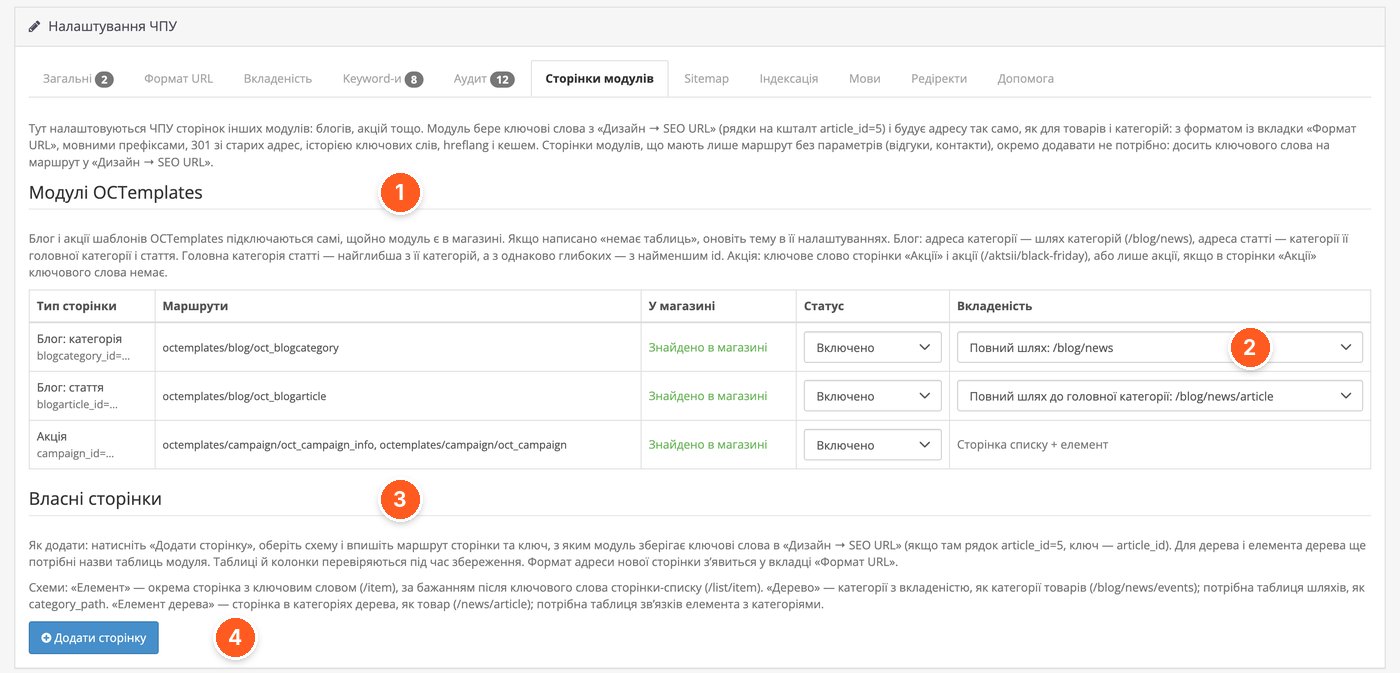
- OCTemplates modules. The blog and promotions connect automatically; the "In store" column shows whether their routes are found.
- Nesting. For the blog category, the screenshot shows the full path /blog/news; for an article, the full path to the main category: /blog/news/article.
- Custom pages. Three schemes: "Item", "Tree", and "Tree item". The tree requires a path table, like category_path; the tree item also requires a relations table with categories.
- "Add page". You choose a scheme, enter the route and key. Tables and columns are checked during saving.
Sitemap for Google
A custom multilingual sitemap for Google Search Console. /sitemap.xml becomes an index, while the addresses themselves are stored in files by type, up to 10,000 in each. Each page is provided in all languages for which it has an SEO URL, with hreflang and x-default links. According to the developer, with 100,000 products the standard OpenCart Google Sitemap runs out of memory, while the module's sitemap collects 200,000 addresses in two languages in about 9 seconds even with 64 MB of memory. The map is cached and rebuilt automatically after changes to products, categories, SEO URLs, and settings.
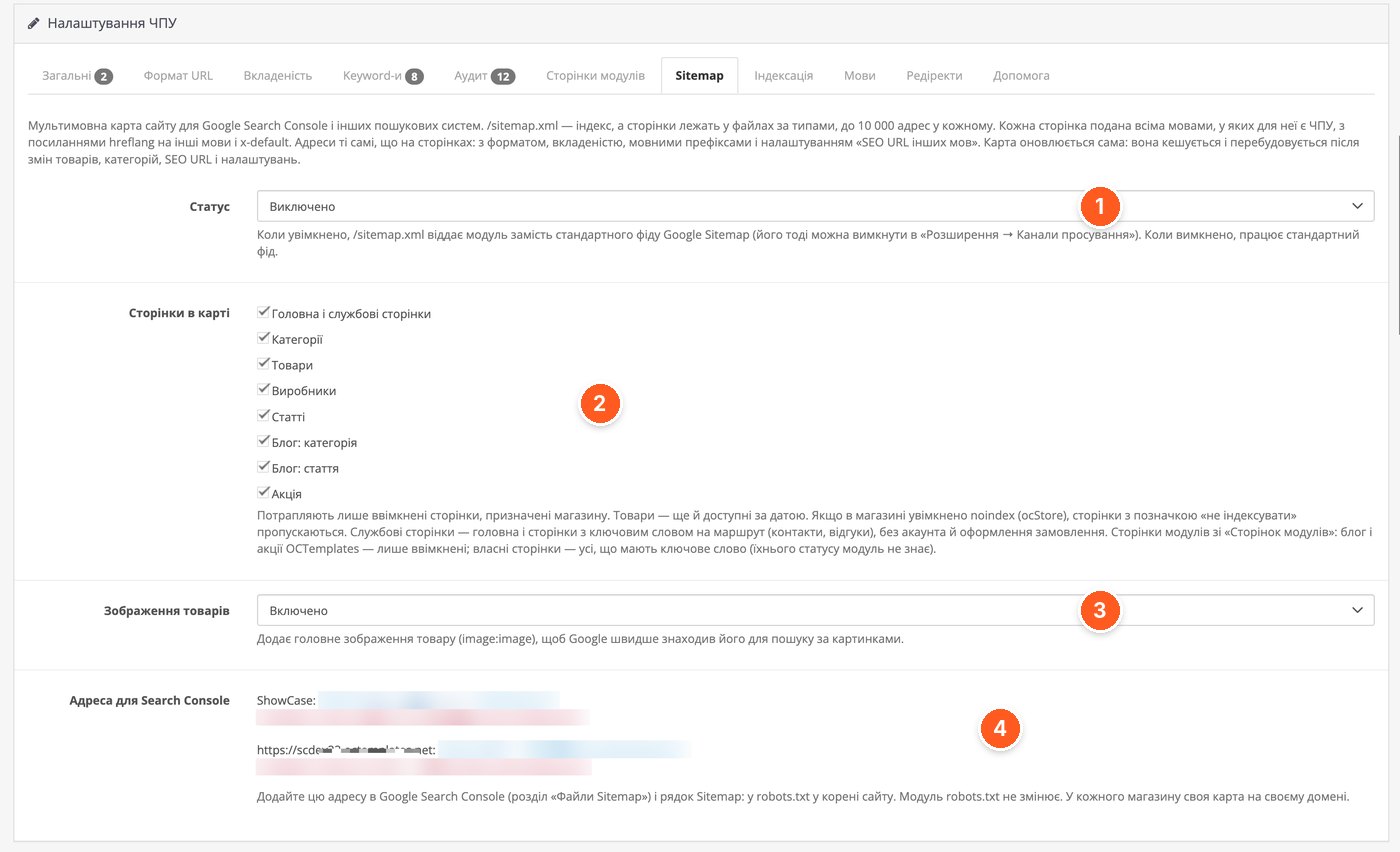
- Status. Disabled in the screenshot. When enabled, /sitemap.xml is served by the module instead of the standard Google Sitemap feed, which can then be disabled in "Extensions → Feeds".
- Pages in the map. Home and service pages, categories, products, manufacturers, articles, blog, promotions. Only enabled pages assigned to the store are included. If noindex is enabled in ocStore, pages marked "do not index" are skipped.
- Product images. Adds the main product image (image:image) so Google finds it faster in image search.
- Address for Search Console. The map address for each store and a ready Sitemap: line for robots.txt. The module does not change robots.txt itself.
Indexing and Canonical
Service pages (search, cart, account) and category copies with sorting or filters receive an X-Robots-Tag header and a robots meta tag. Robots do not add them to the index but follow their links. If the template already outputs its own robots tag (ocStore), another one is not added. These pages also do not appear in the sitemap. The module does not block pagination (?page=2), because Google recommends indexing it. The correct rel=canonical is set on all pages.
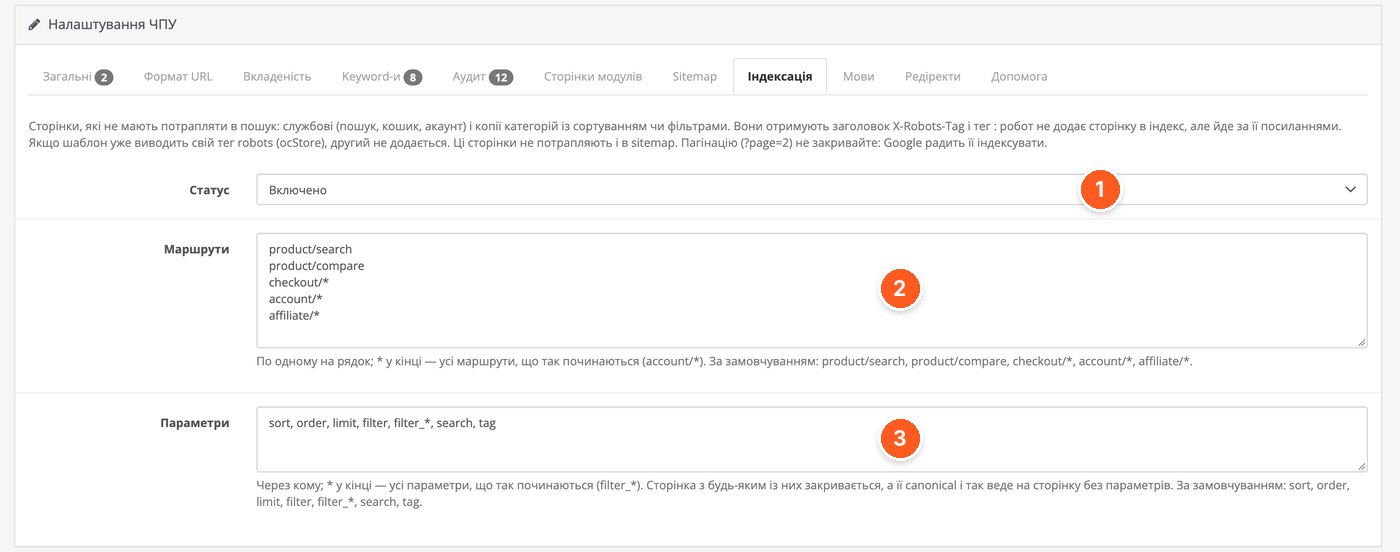
- Status. Enables blocking of service pages and pages with parameters.
- Routes. One per line; an asterisk at the end means all routes starting with that prefix. Default: product/search, product/compare, checkout/*, account/*, affiliate/*.
- Parameters. Separated by commas; an asterisk at the end also works. Default: sort, order, limit, filter, filter_*, search, tag. A page with any of them is blocked, and its canonical points to the page without parameters.
Languages and hreflang
Language prefixes (/en/…), hreflang and x-default on each page, and a language switcher that leads to the same page in another language. An address without a prefix always belongs to the store's main language. If you need to understand how all of this works together, there is a separate article about configuring multilingual support in OpenCart.
The most interesting part here is the "SEO URL of other languages" field, because in real stores SEO URLs are not always filled in for all languages. Mode "Each language its own SEO URL": a page without an SEO URL in the required language opens as /en/?route=…. Mode "Own, and where missing, language X": if there is no English SEO URL, the SEO URL of language X is used, for example /en/iphone-ua. Mode "All languages use the SEO URL of language X": addresses in all languages are the same and differ only by prefix (/iphone, /en/iphone), and addresses with SEO URLs of other languages redirect with 301 to them. The last two modes work only with language prefixes.
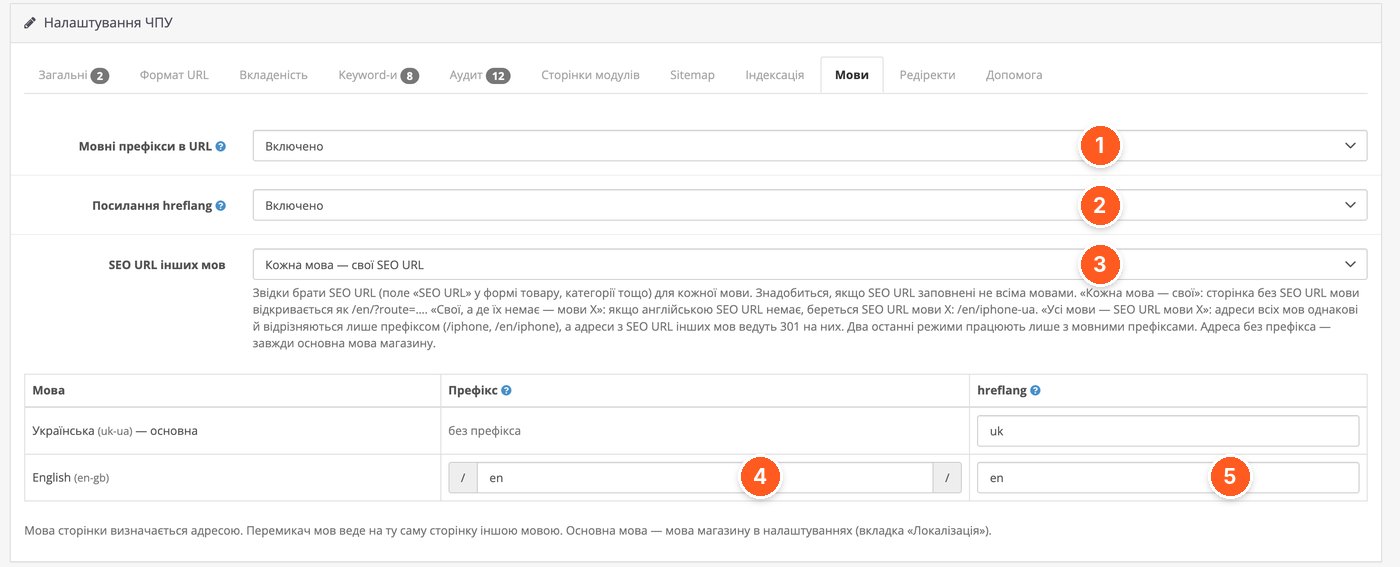
- Language prefixes in URL. Enable prefixes such as /en/.
- hreflang links. Adds hreflang and x-default to pages.
- SEO URL of other languages. Where to take the SEO URL for each language if they are not filled in for all languages.
- Prefix. The main language (Ukrainian) without a prefix; for English, /en/ in the screenshot.
- hreflang. The language code in the attribute, here uk and en.
Redirects and 404 Log
For old addresses that no longer exist on the site (after migrating from another CMS, from an old site, or after deleting products), there are manual rules: 301, 302, or 410, with CSV import and export. A rule applies only where the page is missing, instead of 404, so it does not override working addresses. Advertising parameters (utm_*, gclid) are carried over to the new address.
There are two subtabs next to it. "404 Log" shows addresses that visitors and robots requested but pages were not found for: what broke after migration and where old links still lead. The "Create redirect" button opens the rule form already filled with this address. "Keyword History" remembers old keywords, so after renaming a product or category, the old address redirects with 301 to the new one.
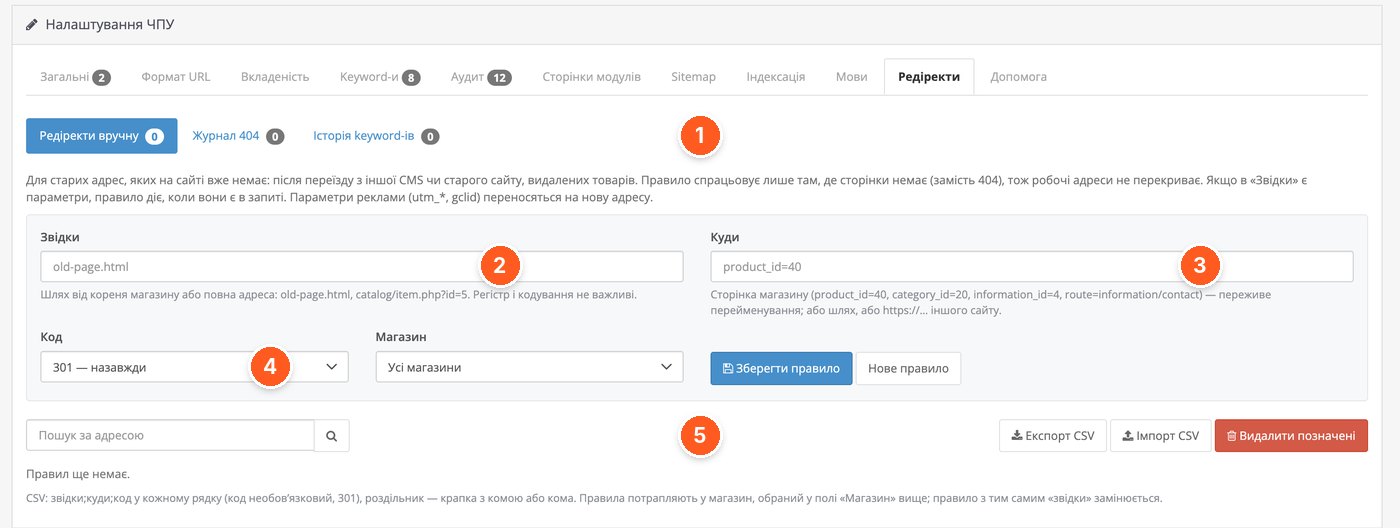
- Subtabs. "Manual redirects", "404 Log", and "Keyword History". The log keeps up to 5000 rows by default; the oldest are deleted automatically.
- From. A path from the store root or a full address: old-page.html, catalog/item.php?id=5. Letter case and encoding do not matter.
- To. A store page (product_id=40, category_id=20, information_id=4, route=information/contact), a path, or https://… of another site. A rule pointing to a store page survives its renaming.
- Code and store. Response type (301 permanent, 302, 410) and the store for which the rule applies.
- CSV. Export, import, and deletion of marked rows. Row format: from;to;code. The code is optional, default 301.
Who It Is For
It is suitable for owners of stores on OpenCart 3 and ocStore who want to manage SEO URLs, redirects, hreflang, and sitemap in one free module. It is especially useful for those with a multilingual catalog where SEO URLs are not filled in for all languages, for those migrating from another CMS who need CSV import of redirects, or for those whose standard sitemap does not fit into memory.
It will not suit you if your server runs PHP below 8.x and you do not plan to upgrade it. The module is also not about meta tags or texts: its description and settings cover only addresses, redirects, sitemap, languages, and indexing. If you already have a working setup with another SEO URL module that causes no problems, there is no point in switching just for the sake of it.
«OCT SEO Pro» from OCTemplates on the OpenCart Code marketplace. You can ask the developer questions about setup directly on the module page.