Some buyers use ad blockers, and the Facebook customer pixel or Google Ads simply doesn't work for them: the event doesn't make it out of the browser. In reports, it looks like the ads are underreporting actual sales.
Standard OpenCart can't help here. There's no native support for GA4, Conversions API, or a product feed for Merchant Center out of the box. You either have to write your own triggers for each template, or assemble a chain of three or four separate extensions that then conflict with each other on a single cart page.
This task is solved by SP SEO Remarketing All In One Pro from developer spectre. On the opencartcode.com marketplace, the module is positioned as a universal solution for event collection.
What the module actually solves
The technical reason for such a gap is often not in campaign settings, but in ad blockers. The client-side JavaScript that sets a Facebook banner or gtag.js simply doesn't work for part of the audience, and some real conversions fall out of the reports. The dog is buried not in pixel settings, but in the event delivery mechanism itself.
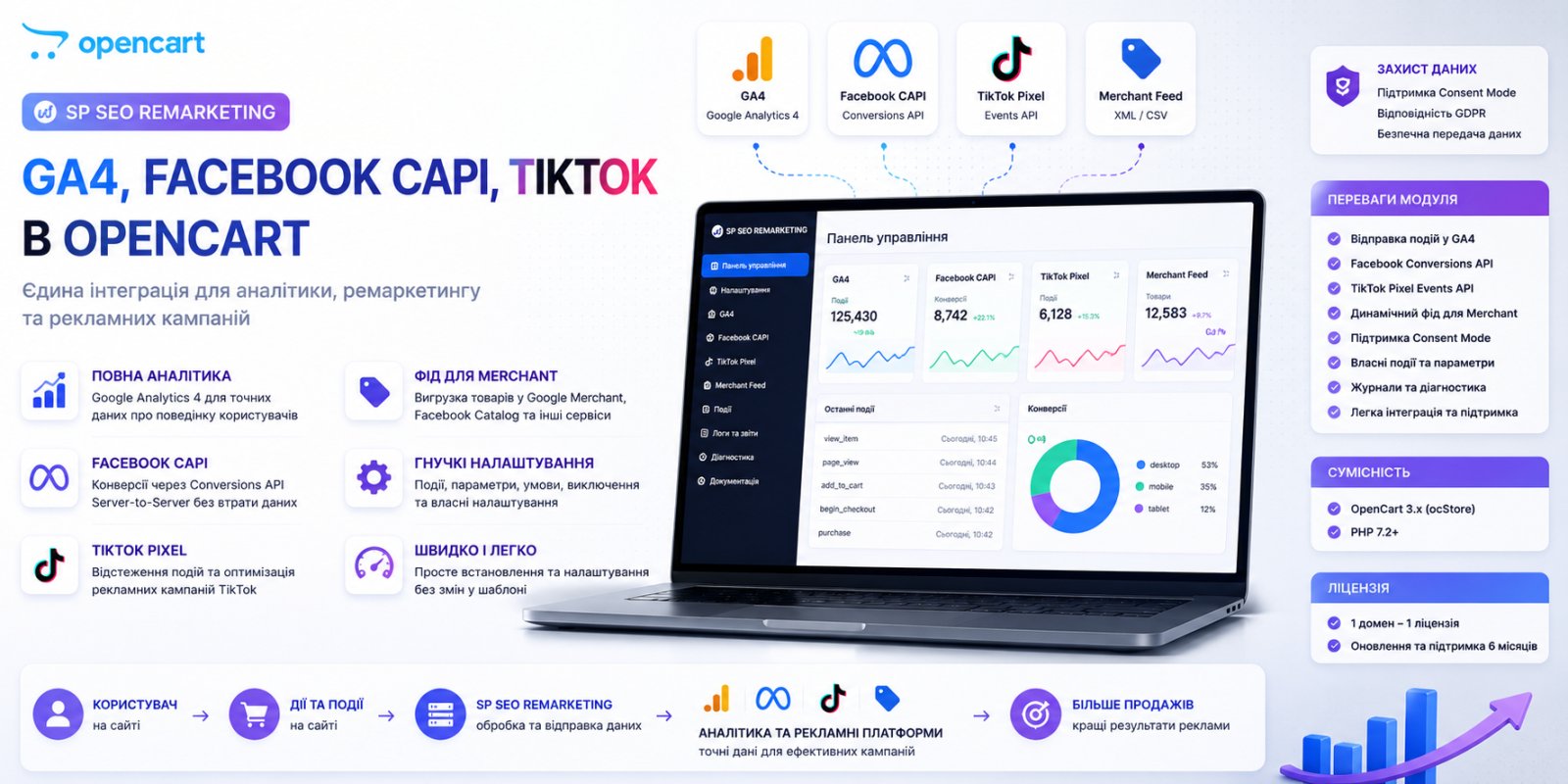
The module closes this with server-side channels: Measurement Protocol for GA4, Conversions API for Facebook, Marketing API for TikTok. According to the developer's documentation, these are server protocols, and events are sent through them even if the user has an ad blocker enabled. The event goes directly from the store's server to the advertising platform, bypassing the user's browser. Client-side and server-side methods can be enabled simultaneously, and the module provides event deduplication between Pixel and Conversions API (as well as between TikTok Pixel and Marketing API) so that a purchase isn't counted twice in the Ads Manager report. This is exactly the moment that beginners regularly miss when trying to manually connect Pixel and CAPI in parallel without such a mechanism: the statistics get inflated, and the client starts suspecting the agency of fudging the numbers.
What's inside: platforms and events
The list of integrations is indeed long: Google Analytics 4, Google Ads, Google Merchant reviews, Facebook Pixel with Conversions API version 21.0, TikTok Pixel with Marketing API, Snapchat Pixel, Microsoft Advertising (Bing), and eSputnik with WEB-tracking support.
For GA4, an almost complete set of enhanced e-commerce events is implemented: view_item_list, view_item, add_to_cart, add_to_wishlist, add_to_compare, remove_from_cart, view_cart, begin_checkout, add_payment_info, purchase, and about a dozen more events for registration, authorization, phone clicks, or Telegram. There are also events for specific templates: callback, found_cheaper, newsletter, store_review tied to octemplates. If you have a custom theme rather than octemplates, these specific triggers simply won't fire without customization.
For Facebook there are more events than for TikTok: ViewContent, AddToCart, AddToWishlist, InitiateCheckout, Purchase, Search, Lead, Contact, CompleteRegistration. For TikTok the set is more modest (ViewContent, AddToCart, AddToWishlist, Purchase, Search), but it's enough for most typical advertising campaigns. eSputnik is interesting because it transmits not only purchases, but also product card views and cart changes. This is data for segmenting abandoned views, which would be quite tedious to implement independently without direct access to store events.
Product feed and Telegram: not just for show
The feed generator for Google Merchant, Facebook Catalog, and TikTok is probably the most well-developed part of the module. There's a choice of product identifier (ID or model), custom SQL conditions for export like AND p.stock_status_id = 5 AND p.export = 1, separate UTM tags for each channel, description truncation to a specified length, and even settings for which category to provide as google_product_category for each catalog branch separately.
There's a nuance worth knowing in advance: the feed doesn't support product options. The developer directly states in the documentation why: to not lose the connection between product ID and remarketing events. If your catalog is built on options (sizes, colors as options rather than separate products), the feed will output the parent product without variations, and in Google Merchant this may look like an incomplete card. For clothing and footwear stores, this is a significant limitation. It's worth checking this before purchase, not after.
Telegram notifications are a nice bonus: messages about new orders, reviews, and inquiries from contact forms. The feature isn't unique, there are plenty of free bots for this, but here it's already built into the module's general logic and doesn't require separate webhook configuration.
Installation, requirements, and pitfalls
Questions will start here if you manage hosting on your own. The module requires IonCube Loader 12+, and this is the first thing to check in your hosting panel before buying. Not all modern hosting providers keep ionCube enabled by default, especially on PHP 8.2+, and without it the module simply won't activate. The list of supported PHP versions is wide: from 7.1 to 8.4.
Second, what you should pay attention to: officially declared compatibility is OpenCart 2.3.0 and 3.0.0–3.0.5.
Another point often overlooked when choosing paid extensions: the module contacts the developer's server to verify the license. In the technical details it's honestly stated that if the developer's server is unavailable, the extension continues to work. This is a plus compared to strict protection schemes where the store simply stops without an internet connection to the license server.
Price, license, and who doesn't need this
At the time of this review, the module cost 60 USD at the base price, with a 45% discount — 33 USD. The license is tied to a single domain, support runs for 365 days from purchase, and after the term expires the module continues to work. There's a discount scale for buying multiple licenses at once: from 10% for two to 50% for fifty, which makes sense for agencies that install the module on every new client project.
Installation and setup services for GA4 or Facebook Pixel are sold separately, although basic setup of one of these two channels is stated as included in the cost for three days after purchase. If you need to set up both channels at once, or if there's a problem with duplicate events from old integrations, these are already paid additional services.
Checklist before purchase
- Check your OpenCart version: 2.3.0–3.0.5 are supported
- Ask your hosting provider if IonCube Loader 12+ is enabled on your PHP version
- Check if your catalog uses product options as a way to vary products: the feed doesn't support them
- If your theme is custom rather than octemplates, some events (callback, found_cheaper, newsletter) won't work without customization
- Decide in advance which channels you need: GA4, Facebook CAPI, TikTok MAPI, Snapchat, Microsoft Ads, or eSputnik