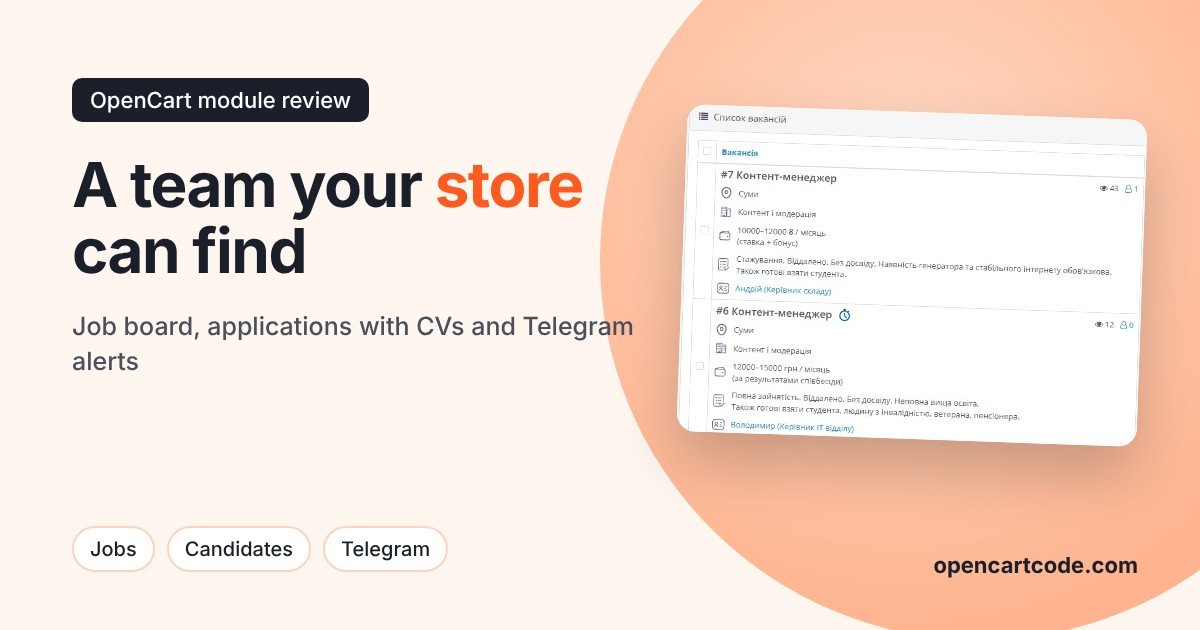
The store is growing, and sooner or later it needs people: a stock keeper, a courier, a content manager. Usually the vacancy gets posted in a news item or on a separate information page, and resumes fly into the general mailbox, where they get lost among orders. The vacancies module from the developer Lito turns OpenCart 3 into a full-fledged "Work with us" section: a page with filters and search, a block on the homepage, an application form with file uploads, a list of candidates with statuses, and notifications in Email and Telegram.
The module is self-contained: it has its own admin panel with the sections "Candidates", "Vacancies", "Cities", "Categories", "Managers", and "Settings". Let's go through the screens.
General settings and notifications
The first tab is responsible for the module's operation as a whole. This is also where the recipients of notifications about new applications are set. Telegram requires your own bot: a step-by-step guide for creating one via BotFather is located right below the fields, and the UserID can be obtained through the bot @getmyid_bot. If you want to send applications to a channel, add a minus sign before the ID.
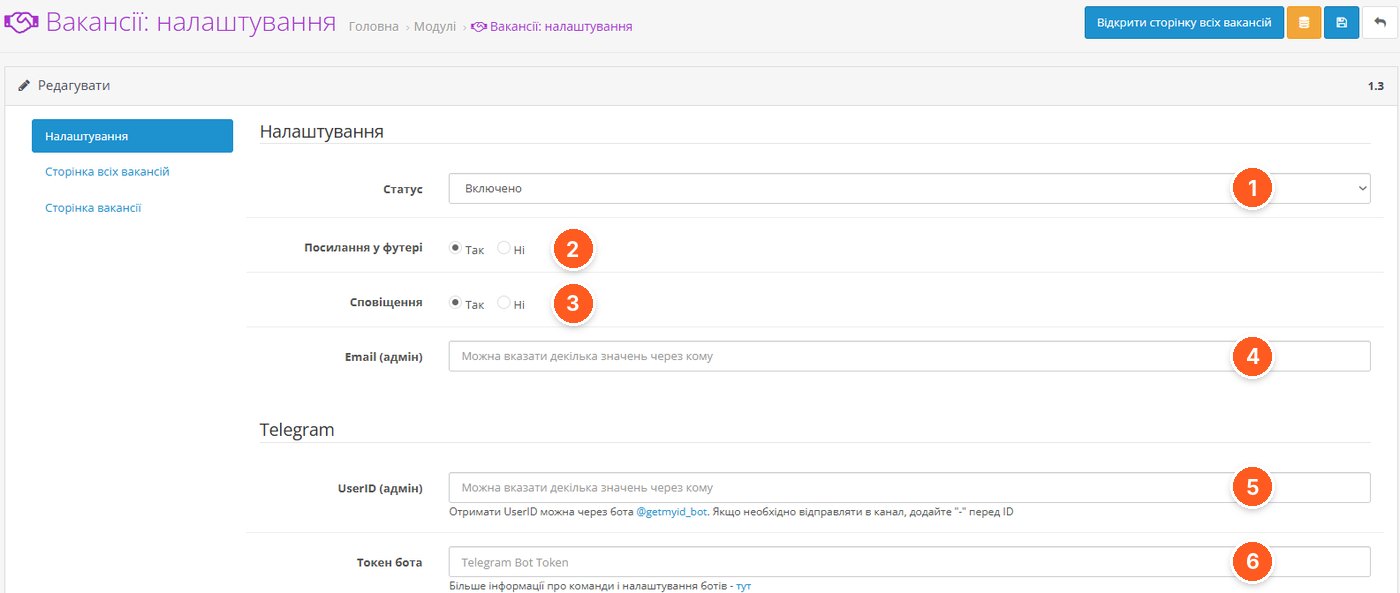
- Status. Enables or disables the module.
- Footer link. Adds a link to the vacancies page in the store footer, without editing the template.
- Notifications. The main switch for notifications about new applications.
- Email (admin). Addresses for applications, multiple addresses can be entered separated by commas.
- UserID (admin). Telegram IDs of recipients, also multiple separated by commas.
- Bot token. The token of your Telegram bot through which notifications are sent.
Vacancy list
Each vacancy in the list is displayed almost the way the candidate will see it: city, category, salary, conditions, assigned manager. Next to it are counters for views and responses, so you can immediately see which vacancy is working and which is hanging around as dead weight. A vacancy can be copied quickly, so similar positions don't have to be filled in from scratch, and when deleting, the module also removes the related resumes and files.
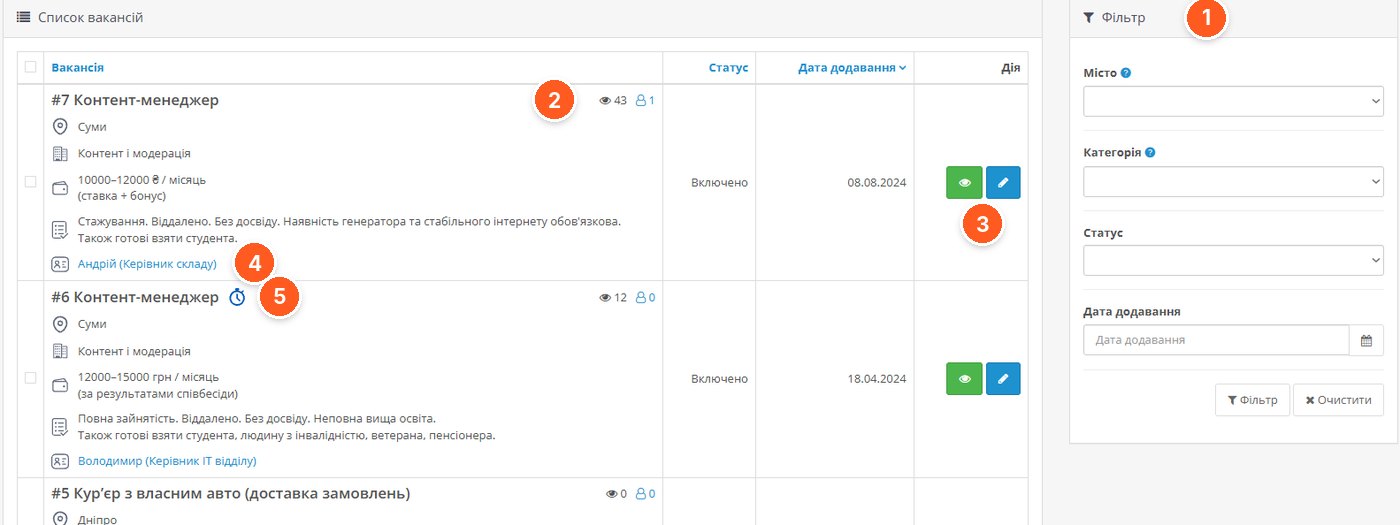
- Filter. Selects vacancies by city, category, status and date added.
- Views and responses. How many times the vacancy was opened and how many applications were received for it.
- View and edit. Open the vacancy on the site or go to edit it.
- Manager. The person responsible for the vacancy, who may also receive notifications.
- "Urgent" mark. Urgent vacancies are highlighted with an icon, and the storefront also shows a "Hot vacancy" label.
Candidates and applications
All responses are collected in the "Candidates" section. Rows are highlighted by color according to status: awaiting processing, accepted, rejected. Attached resumes can be downloaded directly from the list, and an application can be resent to the admin or manager via Telegram or Email. The admin header shows a counter of new applications, so it's hard to miss a response.
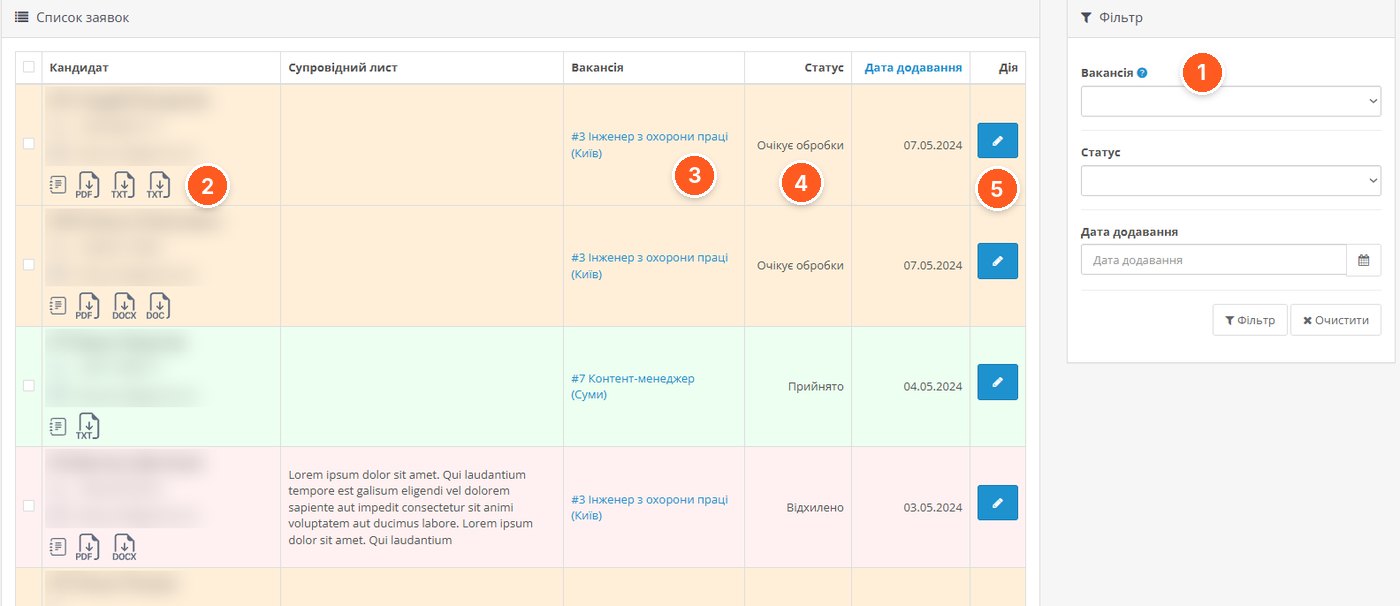
- Filter. Selects applications by vacancy, status and date.
- Candidate files. The resume and other files the candidate attached to the application are downloaded in one click.
- Vacancy. The position the person applied for, with the city.
- Status. The state of the application; the row color depends on it.
- Edit. The application card, where the status is changed.
Application form
On the "Vacancy page" tab, the form that the candidate fills out is configured. It's useful that the phone number validation can be set with a regular expression, and the developer provided examples for Ukrainian numbers right below the field. Custom resume fields can be added separately for each vacancy.
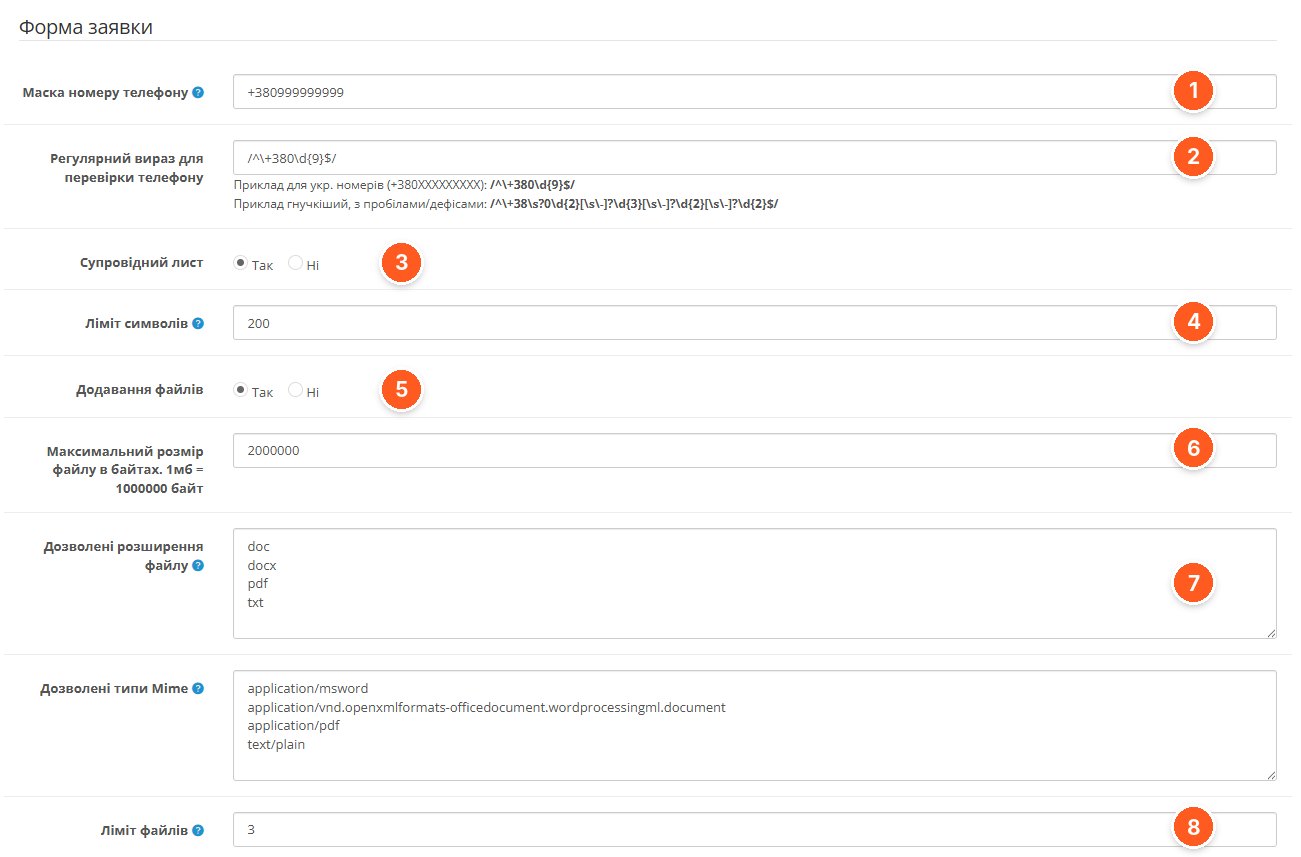
- Phone number mask. The template by which the candidate enters the number.
- Regular expression. Number validation, with ready-made examples for +380.
- Cover letter. Whether to show the field for a cover letter or not.
- Character limit. The maximum length of the cover letter.
- File uploads. Allows attaching a resume to the application.
- Maximum file size. Specified in bytes, 1 MB is 1000000.
- Allowed extensions. By default DOC, DOCX, PDF and TXT; MIME types are set separately below.
- File limit. How many files a candidate can attach to a single application.
Manager contacts on the vacancy page
Next to the vacancy, you can show a card of the responsible manager with a photo, position and contacts. You decide which channels to display: from Email and phone to Telegram, Viber, WhatsApp, Skype, Facebook and Signal. Confirmation of conditions before sending the application is also connected here.
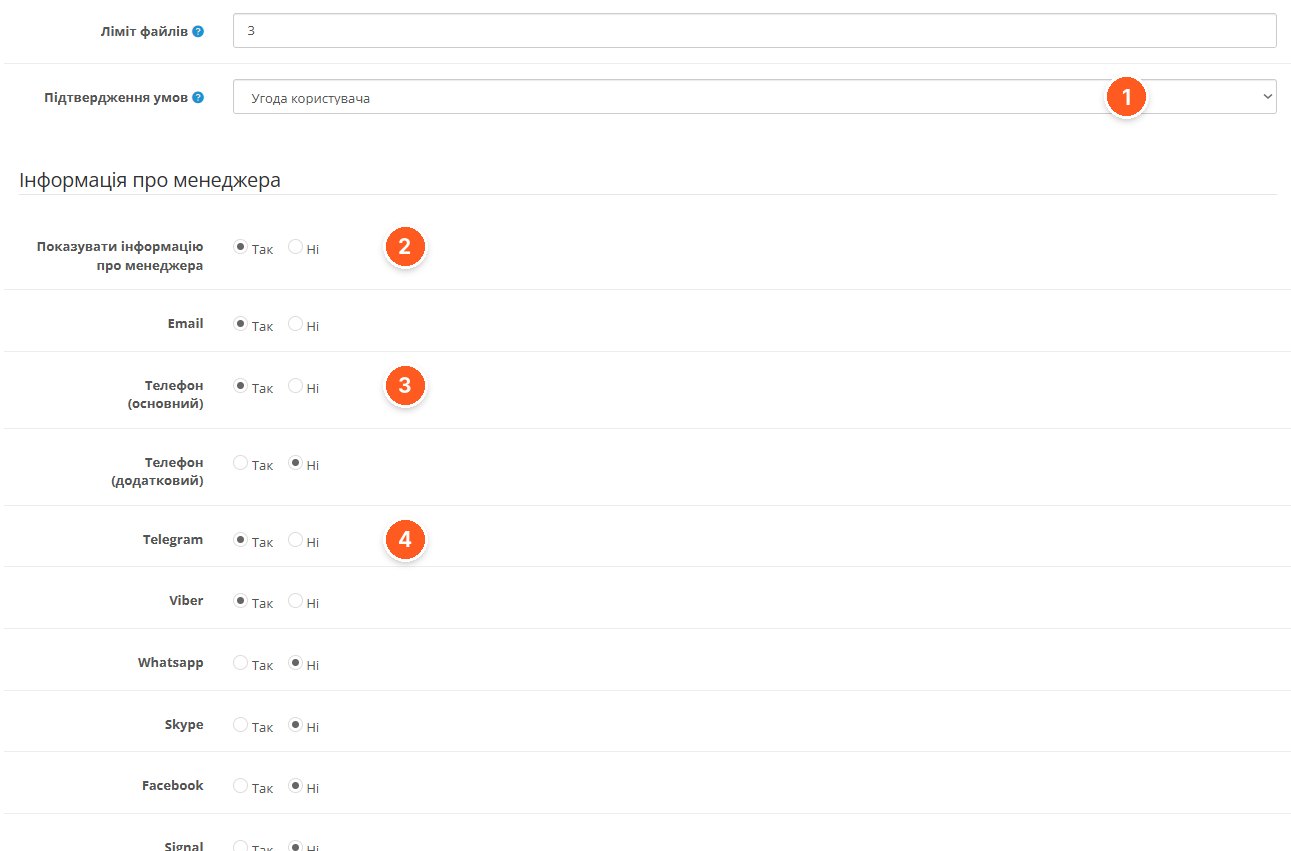
- Confirmation of conditions. Which article the candidate must accept before sending, for example the user agreement.
- Show manager information. Enables the manager card on the vacancy page.
- Phones and Email. Which manager contacts to display.
- Messengers. Telegram, Viber, WhatsApp and others are enabled one by one.
Vacancies block on the homepage
A separate module "Vacancies: module" displays vacancies in any layout position, for example on the homepage. Several modules can be created: say, one only with Kyiv vacancies, another with the "Warehouse" category.
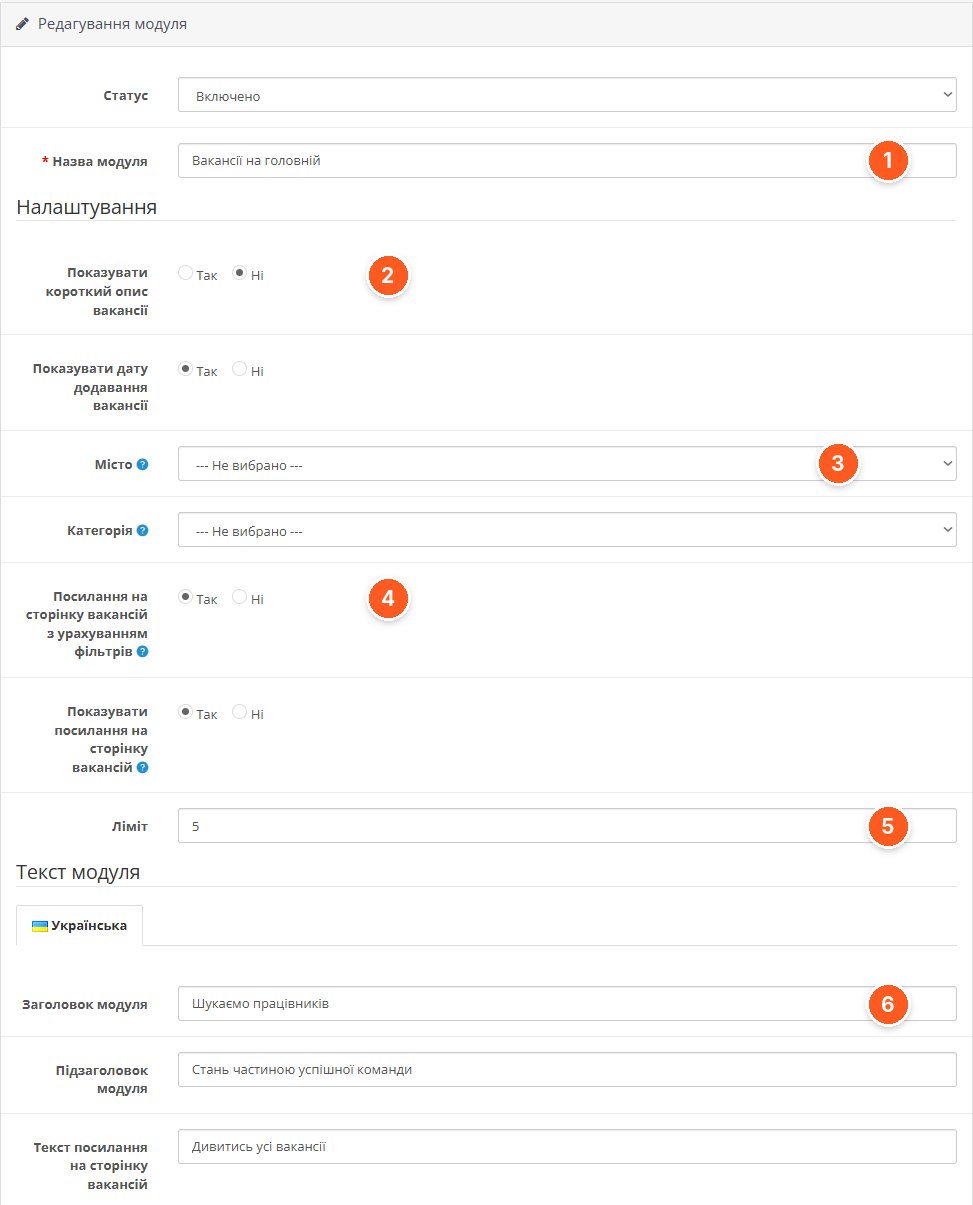
- Module name. An internal name to tell apart several blocks in layouts.
- Short description and date. What to show in the vacancy card.
- City and category. Limit the selection of vacancies for this block.
- Links with filters applied. The button leads to the vacancies page already with the selected city and category.
- Limit. How many vacancies to show.
- Module texts. Heading, subheading and button text for each language.
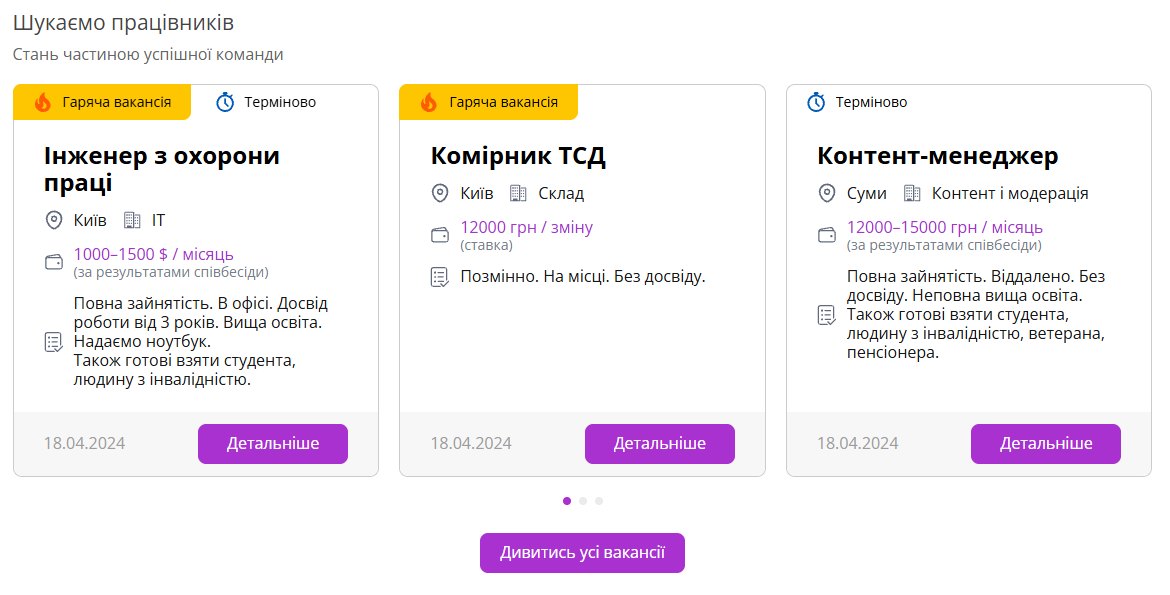
This is how the block looks on the storefront: cards with "Hot vacancy" and "Urgent" labels, salary, conditions and a button to all vacancies.
What to consider before buying
- Works on OpenCart 3.0.x. ionCube is not required, and the module does not contact the developer's server.
- For Telegram notifications, you need to create your own bot, and cURL must be enabled on the server. Check this in advance on a VPS or dedicated server.
- After installation, you need to grant the user group access to all jobs/* sections and separately install "Vacancies: settings" and "Vacancies: module".
- The storefront in the screenshots is made for a specific template. Adapting it to your template's design is done by the developer for a fee, so if your theme is heavily customized, clarify this before purchase.
- The settings screenshots show version 1.3; the current module version is 1.5.
- License for one domain and its subdomains.
Who it suits
Stores and chains that hire regularly: warehouse, delivery, sellers at points of sale, remote managers. Especially if there are several vacancies in different cities and applications need to go to different responsible persons. The module covers the entire cycle from the vacancy page to processing resumes without third-party services.
If you hire one person once a year, a separate section will be superfluous: a regular information page and email will suffice. And if you already have an HR system or a career website, it makes more sense to manage applications there.
«Job board / We are hiring (page, module, managers, notifications) for Opencart 3x» from Lito on the OpenCart Code marketplace. Questions about setup can be asked to the developer directly on the module's page.