Dealers Map for OpenCart 3x
Dealers Map for OpenCart 3x
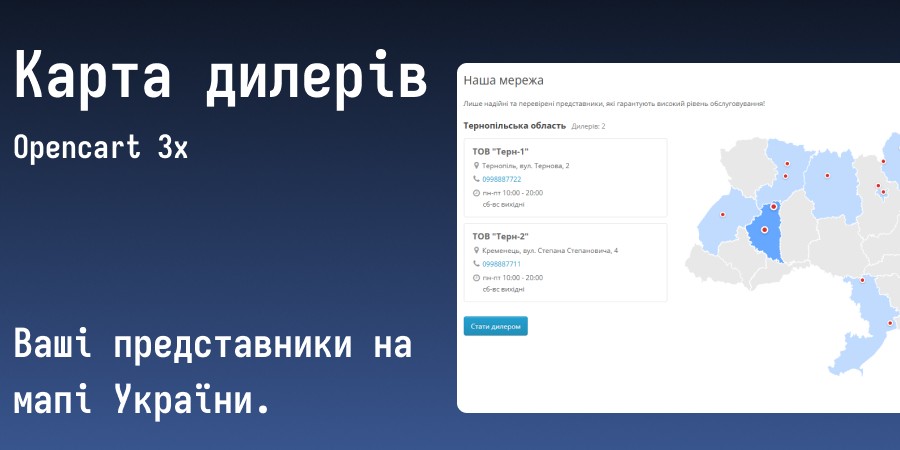
The module adds an interactive map of Ukraine with your dealers to the website and accepts cooperation requests. Suitable for both dealers and your own representative offices: all texts can be changed.
 Lito
Lito
Promo code will be applied automatically when you add the product to cart
Enter domain without www, http, https (e.g. example.com)
Demo
Description
Dealer Map for OpenCart 3x
Interactive Map
- Clicking on a region displays a list of its dealers next to it with contacts, address and working hours
- Two modes for points: each dealer separately or one point per region
- Colors are customizable separately for each region state (normal, on hover, selected, no dealers, inactive) and for points
- Instead of standard points, you can use your own pin image, separately for hover
- It's not necessary to place a point on the map: the dealer will still be in the list
- You can set a region to be open by default
- The map is displayed as a regular module
Convenient Admin Panel
- One page for all dealers: regions in vertical tabs, map on the side
- Multiple dealers are added and saved at once with one button
- You place the dealer point by clicking on the map
- Dealer data is entered separately for each language
- The order of dealers is changed with arrows
- Unsaved changes in a region are marked with dots in the tab
- Saved dealer data is collapsed for convenience; click on the name to expand it
"Become a Dealer" Applications
- The form opens in a popup window: in regions without dealers or below the dealer list
- Standard fields can be enabled, disabled and made mandatory
- You can add custom fields: text, text area, dropdown, radio buttons, checkboxes
- Applications have statuses, filters and bulk actions
- Dealers can be created from selected applications with one click. They are created disabled so you can first verify the data
- Notifications about new applications come to one or multiple email addresses
- A link to an article about personal data processing can be shown next to the submit button
- Protection against spam is provided by application frequency limits and OpenCart's standard CAPTCHA (enabled through the "Contacts" page settings)
- The "Become a Dealer" button can be disabled
- Individual regions can be made inactive: applications for them are not accepted
How to Install:
- Through Admin Panel: Extensions - Install Extensions - select archive and upload, update modifiers
- Grant Permissions: Settings - Users - User Groups - Your Group - check the boxes for viewing and editing for all pr_dealer*
- Install the main module in extensions: Extensions - Extensions - "Dealers: Settings" - enable and configure the appropriate fields - save, install the map display module itself "Dealers: Map"
License for one domain and its subdomains.
Refinement / adaptation to template - paid.
Ask all questions before purchase.
There is no support and will be no support for sites .ru, .by and sites hosted on their hosting.
Specifications
Features
Technical Details
- OpenCart Version
- 3.0.0 3.0.1 3.0.2 3.0.3 3.0.4 3.0.5
- Module Localization
- Ukrainian, English, Russian
- Support Language
- Ukrainian, English
- Activation Method
- Automatic activation
- Ioncube Loader
- No (not required)
- Developer Server Connection
- No
- If Developer Server Unavailable
- Extension works
- PHP Version
- 7.0 7.1 7.2 7.3 7.4 8.0 8.1 8.2 8.3
- Compatible with Templates
- Default
Reviews (0)
Please log in to leave a review.
Log inNo reviews yet
Be the first to review this product!
Questions (0)
Please log in to ask a question.
Log inNo questions yet
Be the first to ask a question about this product!
Changelog
- minor code improvements