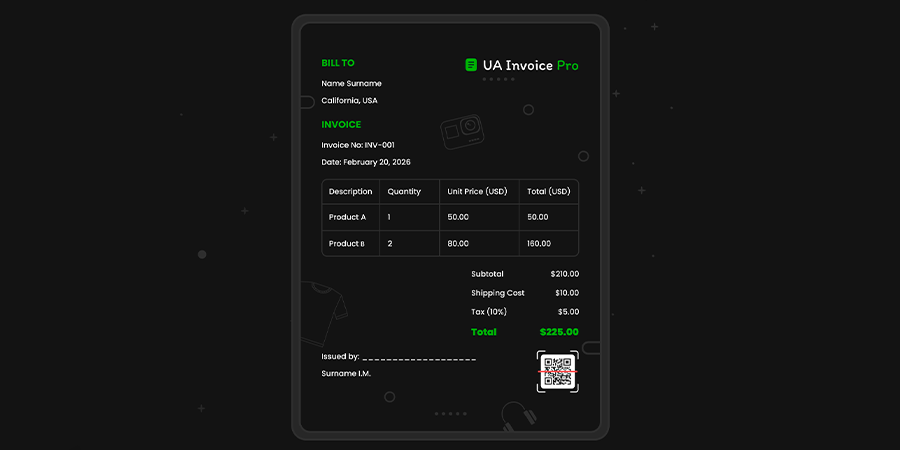
UA Invoice Pro Invoice and Expense Invoice (Multi-FOP + QR)
UA Invoice Pro Invoice and Expense Invoice (Multi-FOP + QR)
The module is designed to generate PDF Invoices and PDF Expense Invoices directly from the OpenCart admin panel.
Technical Details
Demo
Description
The module is designed to generate PDF Invoices and PDF Expense Invoices directly from the OpenCart admin panel. It allows you to automatically generate correct accounting documents based on order data with flexible customization of appearance, templates, and display logic. The module is well suited for working with sole proprietors and non-cash payments.
Documents are created in PDF format and open in a new window with one click. Each document type has its own settings, allowing you to use them in different business scenarios and not be limited to one template.
Main features of the module
Document generation
PDF Invoice
PDF Expense Invoice
Individual settings for each document
Opening a PDF from the admin panel without reloading the page
Appearance
Adding a logo to a document
Adjusting the width and height of the logo
Customize the color of the product table header
QR code for payment
Automatic QR code generation
QR code size settings
Payment assignment template
Macro support in destination text
Ability to display a QR code in a document
Macros and templates
All text fields support macros
Automatic order data substitution
Buyer, payer, and shipping address templates
Product table
Displaying the "No." column
Product model display
Displaying the SKU
Summary and numbering
Renaming standard order summaries
Sorting totals
Document number prefix (for example: INV-)
Integration in the admin area
Displaying standard OpenCart buttons
"Invoice" button with settings for payment methods and order status
"Expense invoice" button with settings for payment methods and order status
Buttons in the order list and on the order page
Senders (individual entrepreneurs)
Adding, editing, and deleting senders
Support for multiple sole proprietorships
Sender fields:
Company name
EDRPOU / TIN
Legal address
Phone and Email
IBAN, bank, MFI
Taxpayer status and VAT rate
Position and "Subscribed"
Additional information
Reviews (0)
Please log in to leave a review.
Log inNo reviews yet
Be the first to review this product!
Questions (0)
Please log in to ask a question.
Log inNo questions yet
Be the first to ask a question about this product!
Changelog
- - Update
About Author

@OcEx
Achievements

First Sale
Made first sale

Rising Star
Achieved significant number of sales

First Purchase
Made first purchase on the platform