EX-Analytics - Order and Product Analytics
EX-Analytics - Order and Product Analytics
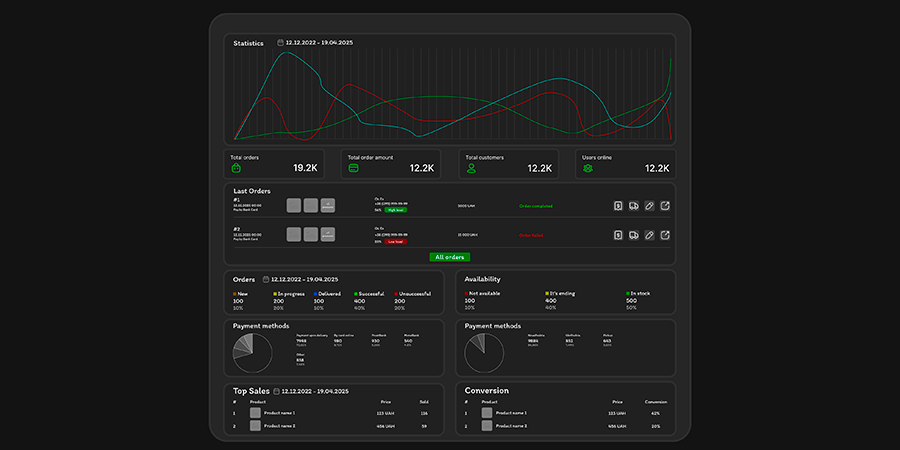
The Ex-Analytics module transforms the standard OpenCart control panel into a modern analytics center, where all the key indicators of your store are collected in one place - clearly, beautifully, and conveniently.
Technical Details
Demo
demo
demo
Description
The Ex-Analytics module transforms the standard OpenCart control panel into a modern analytics center, where all the key indicators of your store are collected in one place - clearly, beautifully, and conveniently.
You no longer waste time on reports and searching for the necessary data - everything you need is visible immediately after logging in to the admin panel.
Smart statistics and visual charts
The main panel displays custom statistics that can be presented as a graph or chart.
You see the number of orders, the sales amount, the average check, and the proportion of successful and unsuccessful orders.
The chart is easily customizable to your needs – you can choose the display period, chart type (line or bar), and line colors.
This makes it possible to quickly assess trends and respond to changes in sales.
Dynamic data loading for the selected period
Ex-Analytics supports dynamic data loading for the selected period.
You can instantly see data for the selected period without reloading the page:
- number of orders
- order amount
- Average check
- number of successful orders
- Number of unsuccessful orders.
This allows you to quickly analyze current indicators and compare them with previous periods — without unnecessary page transitions.
All key information on one screen
At the top of the panel are information blocks where you can immediately see the main store indicators: total number of orders, sales amount, number of buyers, and number of online visitors.
You can assess the current state of the store at a glance without switching between pages and without complex filters.
Recent orders with instant access to details
Ex-Analytics displays a list of recent orders in a convenient and informative format.
This displays the order number, date and time of processing, payment method, product images, buyer contact details, order amount and status.
Additionally, the module calculates the percentage of trust in the customer - the system analyzes the phone number and determines how often this customer places orders.
Each order has quick buttons for editing, viewing, invoicing, or shipping receipt — everything at your fingertips, without unnecessary clicks.
Statistics on statuses, payment and delivery
For detailed analysis, Ex-Analytics displays the distribution of orders by status: new, in processing, delivered, successful, and unsuccessful.
All data is presented not only in numbers, but also in percentages, which allows you to quickly assess the efficiency of the store.
Additionally, the module visualizes data on payment and delivery methods.
Each method is shown as a chart with the name, number of orders, and percentage of the total.
You can immediately see which methods are most popular with customers.
Sales and product performance analysis
Ex-Analytics helps you determine which products bring in the most profit.
The "Top Selling" block displays the most popular products with an image, price, and number of sales.
And the "Conversion" section shows the products that are most often successfully purchased - this is an excellent tool for analyzing marketing and assortment.
If necessary, you can select the analysis period and the number of products to display top sales to focus on the desired time period.
Inventory control
The module also analyzes the remaining goods and divides them into three categories:
in stock, running out (less than five units) and out of stock.
Each group is accompanied by a quantity and percentage, so you can quickly see how many items need replenishment.
This is especially convenient for large stores with a large assortment.
Complete flexibility in settings
Ex-Analytics is designed for those who value convenience and control.
You can customize almost every element:
change the colors and type of the graph, determine which blocks to display on the panel (payment, delivery, top sales, conversion), set the number of displayed products and the analysis period.
Status settings allow you to set individual colors for different stages of order processing and define which statuses belong to the categories "New", "In progress", "Successful", etc.
In addition, the module allows you to rename payment and delivery methods to make the interface as clear and convenient as possible.
If, for example, you have several Nova Poshta options – a branch and a post office – you can combine them under one name.
This makes reports neat and easy to understand.
Easy installation and compatibility
Ex-Analytics works out of the box and does not require complex integration.
The module is fully compatible with any admin panel, and if you have a non-standard theme, paid adaptation is possible.
It is adapted for OpenCart 3.x (and can also be adapted for version 2.3 on a paid basis).
The interface is available in Russian, Ukrainian and English.
Your business under control
Ex-Analytics is not just statistics.
This is a tool that helps you make data-driven decisions: track sales dynamics, find problem areas, and see the real performance of your store.
Thanks to the intuitive interface, clear graphs, and dynamic data loading for the selected period, you always know what is happening with your business - right now.
Reviews (0)
Please log in to leave a review.
Log inNo reviews yet
Be the first to review this product!
Questions (0)
Please log in to ask a question.
Log inNo questions yet
Be the first to ask a question about this product!
Changelog
- Fixed displaying additional products in orders.
About Author

@OcEx
Achievements

First Sale
Made first sale

Rising Star
Achieved significant number of sales

First Purchase
Made first purchase on the platform